
 Try for free
 Blog
Top Metafield Editing Apps for Shopify (2026)
Compare Metafields Guru, Matrixify, Accentuate, Bonify, and Ablestar — prices, merchant reviews, and when Shopify built-in metafields are enough.
Written by Subhendu Singh · Published · Updated
On this page
- Which metafield editing app should you use? (Short answer)
- What are Shopify metafields?
- What are common use cases for metafields?
- Product detail that Shopify does not have a field for
- Internal operations data on orders
- Customer and B2B account data
- Bulk catalog setup and migrations
- Storefront content without a developer
- When can you use Shopify's built-in metafields instead of an app?
- How did we evaluate these apps?
- Which metafield editing app is best? A quick comparison
- Metafields Guru — best for regular editing
- Matrixify — best for one-time bulk jobs
- Accentuate — best for storefront display and change history
- Bonify — budget pick for order metafields
- Ablestar — best for product-only bulk edits
- Which metafield editing app should you pick?
- How to add metafield as a column on the Shopify orders list?
- Frequently asked questions
- Do I need an app to create metafields in Shopify?
- What is the difference between a metafield app and a product options app?
- Which metafield apps can edit order metafields?
- Will a metafield app add a column to the Shopify orders list?
- How many metafields can a Shopify store have?
- Which metafield app has the best reviews?
- Sources (retrieved 8 September 2026)
If you already know what metafields are and how they work, skip to What are common use cases for metafields? or jump straight to the comparison table.
In this guide, we compare the best metafield editing apps for Shopify in 2026 — what each one costs, what merchant reviews actually say about them, and when you do not need an app at all.
Written by Subhendu Singh, founder of Orderline · Reviewed by Anjali Rathore · Updated 8 September 2026
Key Takeaways
- Metafields are built into Shopify and free. For a handful of fields filled in by hand, you do not need any app — use Settings → Metafields and metaobjects.
- Metafield apps are faster editors for the same fields: bulk editing, Excel import, and (on some apps) a history of changes.
- Best picks: Metafields Guru for regular editing, Matrixify for one-time bulk jobs, Accentuate for storefront display plus change history, Bonify as the budget pick.
- If you want to use metafields as columns in the orders view, for example delivery date and time, read How to Add Custom Columns to Shopify Admin Orders.
Which metafield editing app should you use? (Short answer)
If you are in a hurry:
- A handful of fields, typed by hand: stay with Shopify’s built-in metafields. Free, already in your admin.
- Regular editing across products, orders, and customers: Metafields Guru (~$19/month).
- If you prefer working with excel to bulk import or cleanup: Matrixify (Excel, CSV, Google Sheets).
- Fields shown on your storefront, with a history of changes: Accentuate ($25/month).
Ratings and prices below are as of September 2026 — please re-check the app listing before you buy.
What are Shopify metafields?
A metafield is an extra field you attach to something in Shopify — a product, a customer, an order, a collection, or a variant. Simply put, metafields are a way to store extra data in Shopify. For example, ”burn time” for a candles seller or “supplier SKU.”
You create the field once — give it a name and pick the kind of value it holds (text, a date, yes/no, a file, a number) — then fill in the value on each product, order, or customer. Shopify’s own guide: metafield definitions.
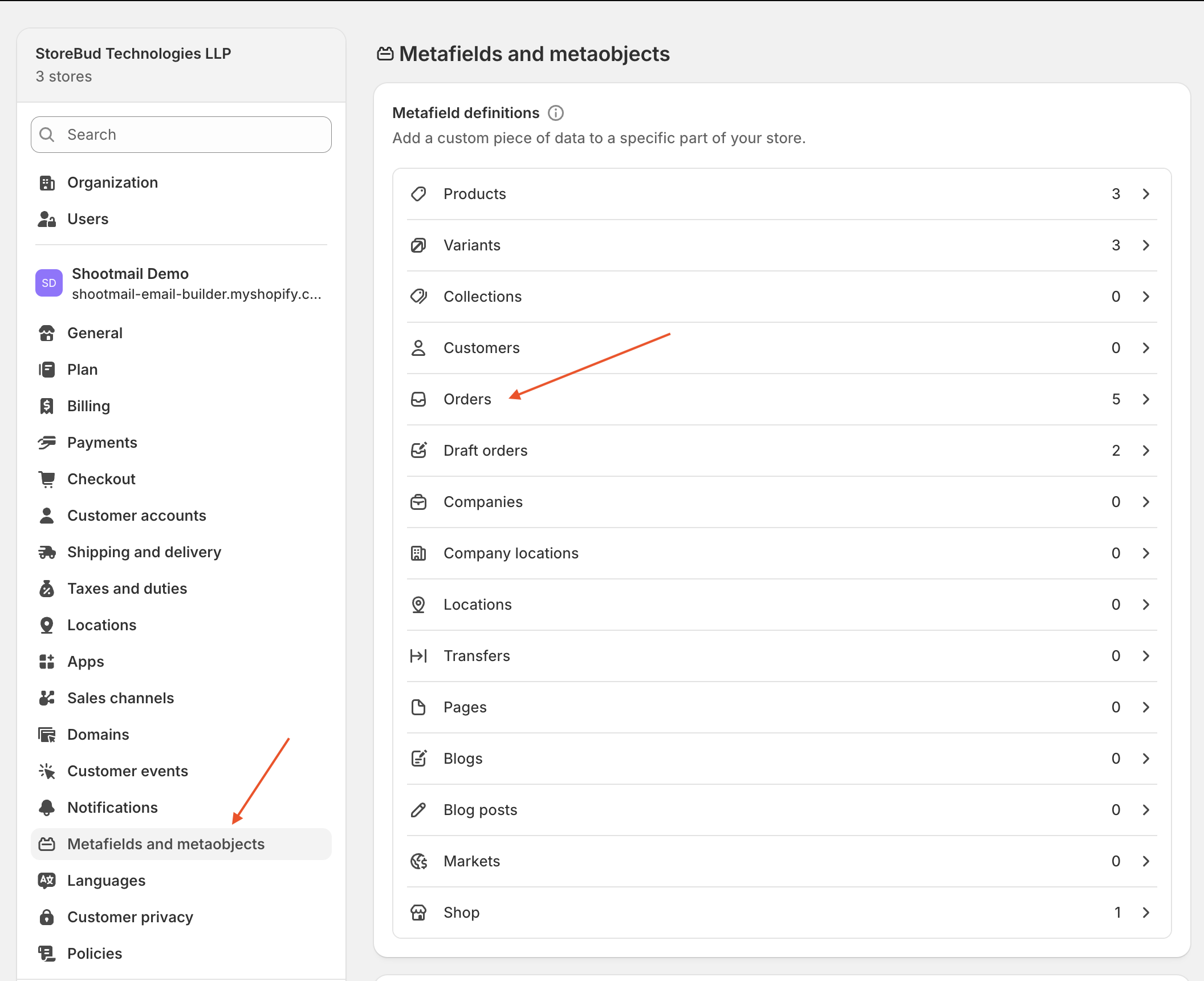
You can do this for free, today, without any app: Settings → Metafields and metaobjects → Orders (or Products, Customers) → Add definition. Shopify allows up to 250 such field definitions per store, and up to 50 of them can be pinned for quick access on each resource. That is plenty for most stores.
Metafields are not the same as product options. Product options collect choices from customers on the product page (engraving text, delivery date). Metafields store data that your team or systems maintain. Some stores need both — see Top Shopify Product Options Apps (2026).
What are common use cases for metafields?
Here are the jobs merchants most often solve with metafields — and why the built-in editor sometimes falls short.
Product detail that Shopify does not have a field for
A candle brand stores burn time, scent notes, and care instructions on each product. A supplement seller stores ingredient lists and allergen warnings. A fashion store stores fabric composition and size chart links.
These values often need to appear on the storefront too — not just in the admin. Metafields hold the data; a theme block or metafield app displays it.
Internal operations data on orders
A print shop stores a QC status and press-file link on each order. A wholesale business stores retailer name and PO number. A made-to-order workshop stores production stage and assigned technician.
This is data your staff fills in — not something the customer typed at checkout. When you have dozens of orders to update at month-end, editing one order at a time in the admin becomes the bottleneck.
Customer and B2B account data
A wholesale store links each customer account to a price list, credit limit, or ERP account ID. A membership store stores loyalty tier or renewal date on the customer record.
Metafields Guru merchants specifically praise using customer metafields to connect wholesale accounts for CSV order imports — a workflow the built-in admin makes painful at scale.
Bulk catalog setup and migrations
Moving from another platform, launching 5,000 SKUs, or syncing data from an ERP? You need to create hundreds of field definitions and fill in values across the whole catalog at once. That is where import/export tools like Matrixify earn their keep.
Storefront content without a developer
Size charts, FAQs, ingredient panels, and spec tables can all live in metafields and render on product pages through theme blocks. Accentuate and Bonify both target this use case — editing the data and displaying it on the storefront.
When can you use Shopify’s built-in metafields instead of an app?
| Stay with Shopify’s built-in metafields when… | Use an app when… |
|---|---|
| You have a handful of fields | You have hundreds of products or orders to fill |
| Values are typed one at a time | You need Excel/CSV import, bulk edits, or copy between stores |
| Simple types (text, date, yes/no) | You need HTML, repeating groups, or a history of changes |
| You only need the values inside the admin | You want to show them on the storefront without a developer |
If the left column sounds like you, stop here — you just saved yourself a monthly subscription.
How did we evaluate these apps?
We compared apps on things that matter in daily work, not just feature lists:
- Which Shopify resources each app supports (products, orders, customers, variants, collections)
- Bulk editing, import/export formats, and change history
- What the free plan actually includes
- Review quality — we read critical reviews too, not just the stars
- How long the app has been around, and how responsive support is
We left out brand-new apps with only a handful of reviews. Ratings and review counts below come from each app’s Shopify App Store listing, retrieved 8 September 2026. We also read filtered low-star reviews on the App Store to identify recurring complaints.
Which metafield editing app is best? A quick comparison
| App | Rating | Price | Best for | Watch out for |
|---|---|---|---|---|
| Shopify built-in metafields | — | Free | Creating fields and typing values one at a time | No bulk editing, no change history |
| Metafields Guru | 5.0★ (241 reviews) | Free to install; ~$19/mo | Spreadsheet-style editor for everything, including orders | Bulk actions use app credits on cheaper plans; free tier limited for testing |
| Matrixify | 4.9★ (~1,500 reviews) | Paid plans from ~$20/mo | One-time bulk import/export with Excel, CSV, Google Sheets | Spreadsheet pipeline, not a daily editor; learning curve |
| Accentuate Custom Fields | 4.8★ (167 reviews) | Free for storefront blocks; $25/mo | Bulk editing + 90-day change history + storefront display | Serious editing needs the paid plan |
| Bonify Custom Fields | 4.6★ (112 reviews) | Free for dev stores; ~$14–19/mo | Fields plus storefront widgets; imports include orders | Smaller review base; some merchants report site-speed impact |
| Ablestar Bulk Product Editor | 4.9★ (904 reviews) | Free plan + paid from ~$30/mo | Bulk product edits with preview and undo | Products only — not orders |
One thing none of these apps do: add columns to Shopify’s orders list. More on that at the end.
Metafields Guru — best for regular editing
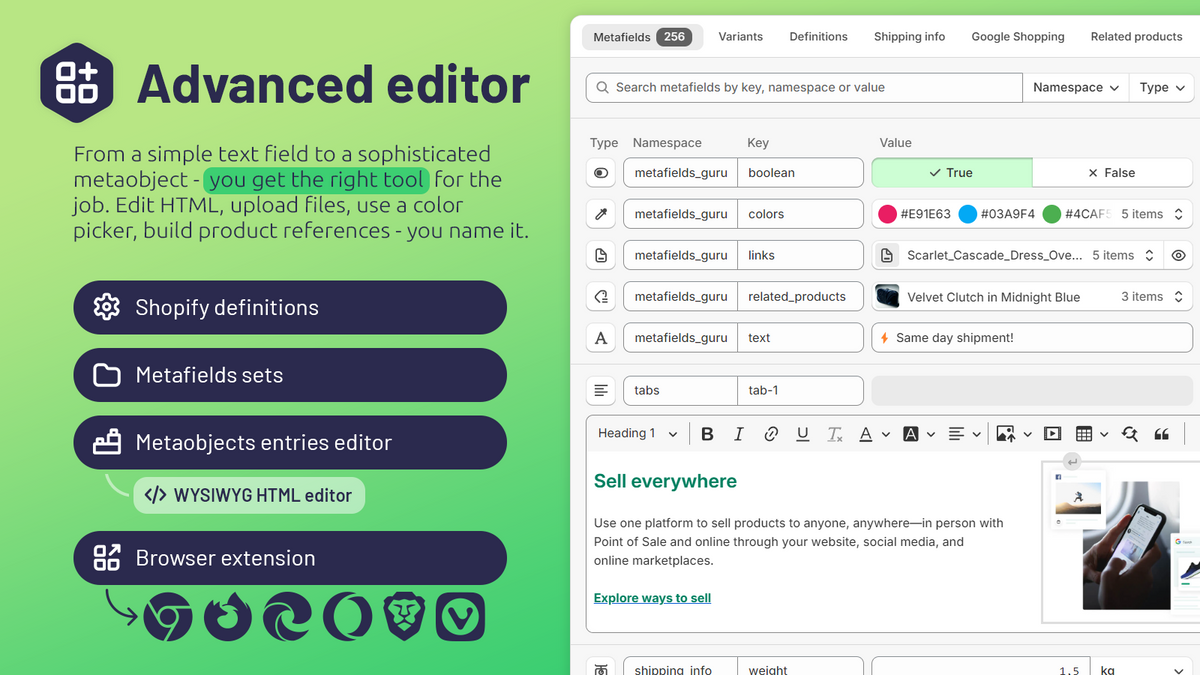
Metafields Guru (launched April 2019) is a spreadsheet-style editor inside your Shopify admin — the strongest pick for teams that edit metafields weekly across products and orders. It works on products, customers, orders, collections, and metaobjects — with bulk import/export, a browser extension for quick inline edits, and Shopify Flow support.
What merchants praise (from App Store reviews):
- Validation before bulk writes. Long-term users call the built-in validation “outstanding” — it catches bad data before it hits your store. One merchant with 3+ years on the app said it prevents errors “when working at scale.”
- Fast, solution-oriented support. Multiple reviews mention support responding quickly with real fixes, not FAQ links. Merchants report help with CSV/JSON upload errors and theme compatibility issues.
- ERP and integration workflows. Reviews highlight metafields exposed via the Shopify API for syncing with tools like Celigo — useful for keeping ERP and Shopify data aligned.
- Non-developer friendly. Several merchants note they are “not a developer” but find the app simple for day-to-day updates.
What merchants criticize:
Free tier is too limited to evaluate. The single 1-star review (September 2026) complains the free plan is “useless” for a real test drive, and that large stores must jump to the top paid tier (~$60/month) before knowing if the app fits.
Browser extension gaps. A 4-star review wishes the inline editing extension worked on blog posts and pages, not just products.
Bulk actions cost credits on cheaper plans — worth checking plan limits before a big job.
Best when: your team edits metafields every week across products and orders.
Skip if: you only need one big import — Matrixify is better suited.
Price: free to install; Guru plan around $19/month.
Matrixify — best for one-time bulk jobs
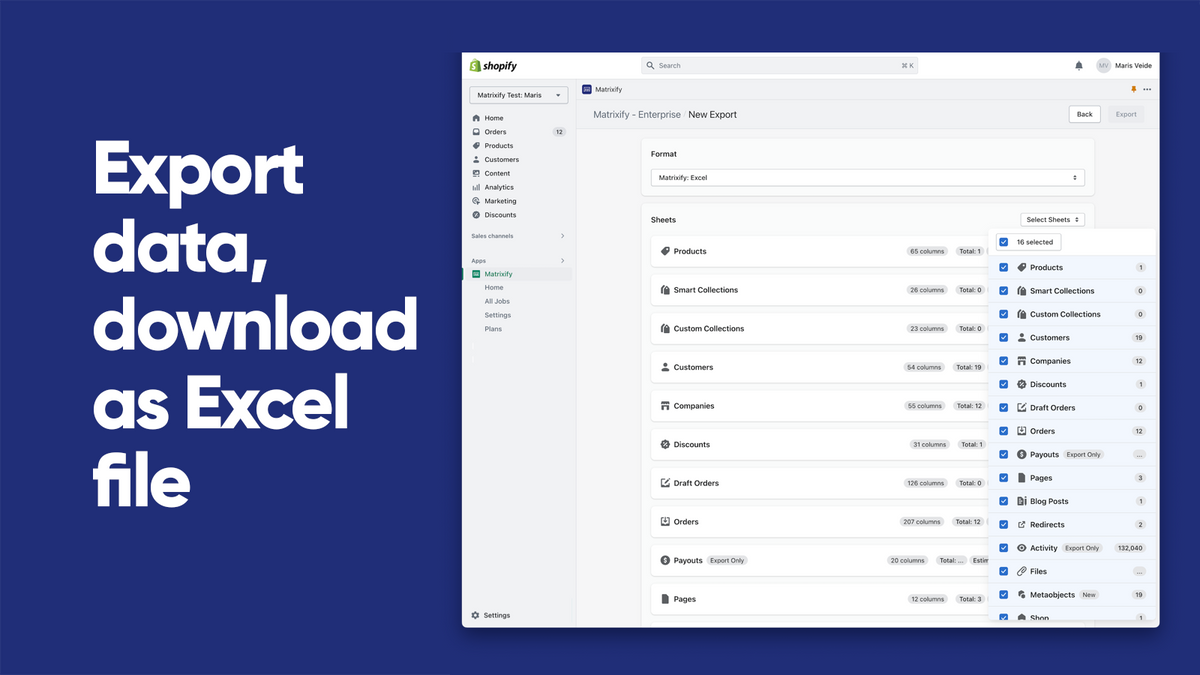
Matrixify (launched July 2017, ~1,500 reviews) is the long-running specialist for moving data in and out of Shopify with Excel, CSV, or Google Sheets — including order metafields, product metafields, and metaobjects. It excels at one-time migrations, large catalog jobs, and scheduled exports, though it is not built for daily editing. Merchants running catalogs of 250,000+ products describe it as essential.
What merchants praise:
- Reliable at scale. Reviews from large-catalog merchants (lawn & pet supplies, print-on-demand, multi-vendor stores) say Matrixify is the only practical way to organize hundreds of variant templates or sync massive product sets.
- Safer bulk workflow. The app validates files before writing anything to your store. Support explains this deliberately — blank columns or missing headers trigger errors rather than silently corrupting data.
- Covers the full Shopify data model. Exports and imports span products, orders, customers, collections, and metafields — making it the go-to for migrations and accountant-ready reports.
What merchants criticize:
Not beginner-friendly. The most common 1-star complaint: “Unless you are an Excel guru this app is rubbish.” Error messages on download/upload frustrate merchants who expect a simple point-and-click tool.
Still manual in places. Even fans note “it’s still a lot of work” — Matrixify gives you the pipeline, but you still build and clean the spreadsheet.
Pricing scales with data volume. Critical reviews flag that plan tiers ($20, $50, $200/month) are based on rows processed per job, which can feel steep for B2B company imports or very large catalogs.
Best when: you have a large one-time job — import 5,000 products’ worth of fields, or export everything for your accountant.
Skip if: you want a friendly daily editor. Matrixify is a spreadsheet pipeline; there is a learning curve.
Price: paid plans from ~$20/month, sized by data volume.
Accentuate — best for storefront display and change history
Accentuate Custom Fields (launched November 2016, 167 reviews) is more than an editor: bulk editing with Excel import, a 90-day history of every change, and theme blocks that display your fields on the storefront (size charts, FAQs, ingredient lists) without custom code. It is the strongest pick when metafields need to show on product pages and you want an undo trail for bulk edits.

What merchants praise:
- Storefront customization without developers. Reviews consistently highlight using Accentuate for custom product page sections — dropdowns, text areas, number fields — that themes alone cannot handle.
- Strong support on theme issues. One merchant reported Accentuate support investigating and fixing a problem caused by a Shopify platform update — proactive, not reactive.
- Long-term reliability. Multiple reviews mention using the app for “a number of years” across product pages and custom sections.
What merchants criticize:
UX friction when things change. A 3-star review notes that adding new sizes “invariably doesn’t work” and requires a developer to fix — suggesting the admin UI has rough edges for non-technical teams.
Billing surprises. Another 3-star review describes being asked to pay a second full-year subscription mid-term after a price increase, requiring support intervention.
Paid plan required for serious editing. The free plan covers storefront blocks; bulk editing and change history sit on the $25/month Professional plan.
Best when: the fields you create also need to show up on your store, and you want an undo button for mistakes.
Skip if: you only need internal admin fields — the free plan is mostly about storefront blocks.
Price: free for theme blocks; Professional $25/month ($250/year).
Bonify — budget pick for order metafields
Bonify Custom Fields (launched April 2016, 112 reviews) covers field creation plus storefront widgets at the lowest price on this list. Its import tool works with orders and draft orders — rare at this tier. It also handles eBay item specifics if you sell on multiple channels. Worth testing on a staging theme first if site performance is a concern.
What merchants praise:
- Responsive support. Multiple reviews mention issues resolved in minutes — customization help, technical fixes, and polite communication.
- Long-term storefront use. Merchants report running Bonify for years to add customization on product pages.
- Affordable entry. Pro plans around $14–19/month undercut Accentuate and Metafields Guru for basic field + display needs.
What merchants criticize:
Site speed and SEO concerns. The harshest 1-star review (2025) blames Bonify for slowing the site, conflicting with baseline CSS, and hurting SEO. This is one review, not a pattern — but worth testing on a staging theme before going live.
Billing during development. 1-star reviews mention charges arriving while the store was still in development, despite a advertised free trial period.
Smaller review base. At 112 reviews, there is less social proof than Metafields Guru (241) or Ablestar (904).
Best when: you want order metafield imports at the lowest price.
Skip if: you want a large review base to lean on, or your theme is performance-sensitive.
Price: free for development stores; Pro around $14–19/month.
Ablestar — best for product-only bulk edits
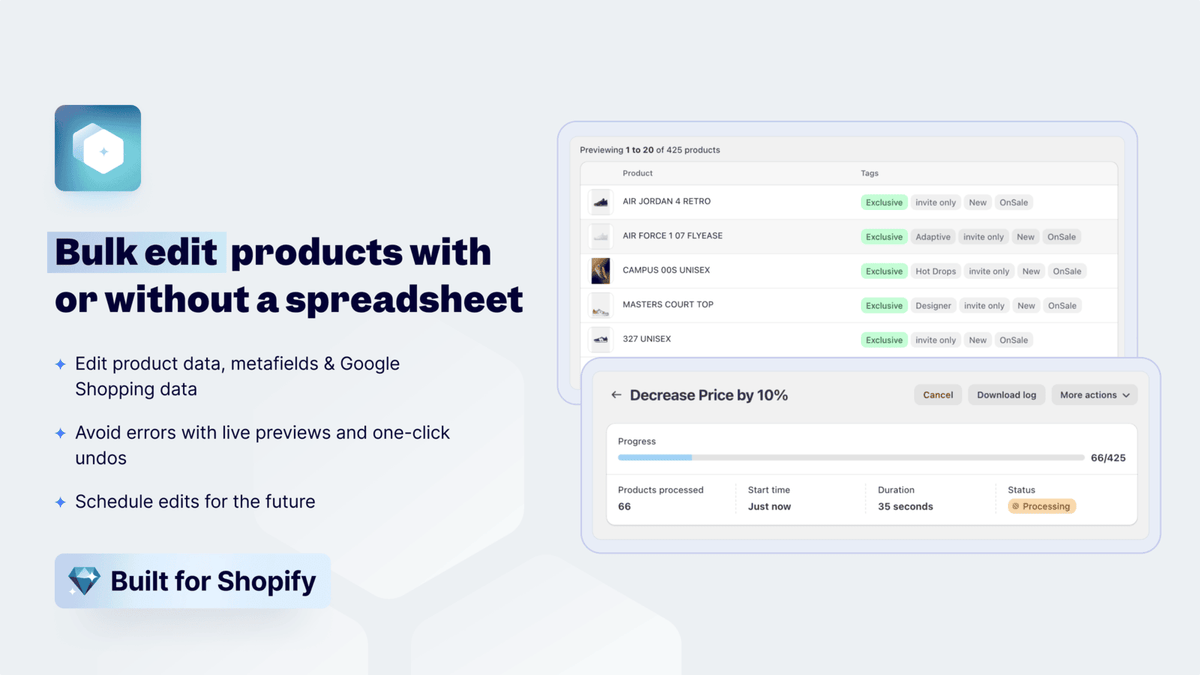
Ablestar Bulk Product Editor (launched July 2017, 904 reviews) is a bulk editor for your product catalog with preview before changes apply and undo after. Metafields are one of many fields it can edit in bulk alongside prices, tags, descriptions, and inventory. It is the strongest pick for product-only bulk work — but it does not touch orders.
What merchants praise:
- Essential for large catalogs. Reviews call it a “lifesaver” and “game changer” for stores with hundreds or thousands of SKUs — bulk-editing tags, metafields, stock levels, and prices in one pass.
- Preview and undo. Merchants value seeing exactly which SKUs will change before committing, plus the ability to roll back.
- Advanced filtering. Reviews highlight filtering by profit margins and cost fields in spreadsheet exports — useful for pricing workflows beyond metafields alone.
What merchants criticize:
Products only. Ablestar does not edit order or customer metafields. If your workflow is order-centric, this is the wrong tool.
Edge-case bugs. A detailed 1-star review describes saved filters silently stopping work, and image alt-text bulk edits failing repeatedly despite support exchanges.
Support inconsistency on niche issues. While many praise support (one merchant credits “Alison” for saving manual hours), the alt-text complaint suggests complex edge cases can take multiple back-and-forth cycles.
Best when: your work is 100% products — prices, descriptions, and product metafields together.
Skip if: you need to edit order metafields.
Price: free plan available; paid plans from ~$30/month.
Which metafield editing app should you pick?
| Your situation | Best pick | Cost |
|---|---|---|
| A handful of fields, typed by hand | Shopify’s built-in metafields | Free |
| Regular editing across products and orders | Metafields Guru | ~$19/mo |
| One-time migration or big cleanup | Matrixify | Paid plans from ~$20/mo |
| Fields shown on the storefront + change history | Accentuate | $25/mo |
| Tight budget, orders included | Bonify | ~$14–19/mo |
| Bulk product edits with undo | Ablestar | Free plan + paid from ~$30/mo |
How to add metafield as a column on the Shopify orders list?
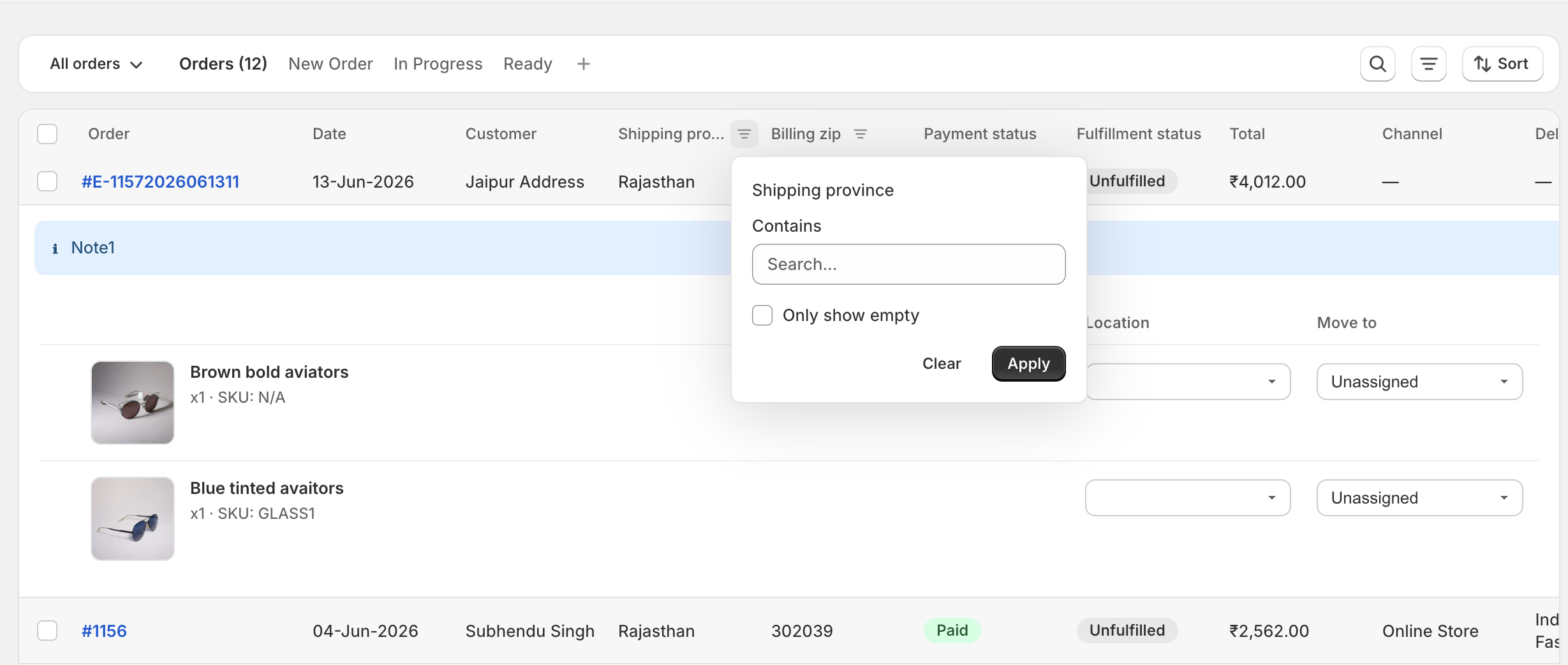
For some merchants, metafields hold critical data required for the order fulfilment. For example, a florist, baker or a personalized gifts maker might require delivery date and delivery time fields to be visible right in the orders queue, so that the fulfilment staff can easily plan and work accordingly.
Orderline lets you add any metafield as a dedicated column. Orderline has its own orders management screen though, it does not add a column on the official Shopify orders table.
Frequently asked questions
Do I need an app to create metafields in Shopify?
No. Go to Settings → Metafields and metaobjects, pick Orders, Products, or Customers, and click Add definition. It is free and built in. Apps only help when typing values one at a time becomes too slow.
What is the difference between a metafield app and a product options app?
A metafield app manages data your team maintains (burn time, QC status, supplier name). A product options app collects choices from customers on the product page (engraving text, delivery date). Different jobs — some stores need both.
Which metafield apps can edit order metafields?
Metafields Guru, Matrixify, and Bonify can. Ablestar cannot — it is products only. Accentuate supports orders along with products and customers.
Will a metafield app add a column to the Shopify orders list?
No. These apps edit the data stored on orders. The orders list in Shopify admin stays exactly the same. For columns, see our custom columns guide.
How many metafields can a Shopify store have?
Up to 250 field definitions per store, with up to 50 pinned per resource for quick access. Most stores never come close.
Which metafield app has the best reviews?
As of September 2026: Metafields Guru holds a 5.0★ rating across 241 reviews; Ablestar has 4.9★ across 904 reviews; Matrixify has 4.9★ across ~1,500 reviews. Bonify has the smallest review base at 112 reviews (4.6★). Star ratings alone do not tell the full story — read the critical reviews for your use case before committing.
About the author
Subhendu Singh is the founder of Orderline. He builds order management software for Shopify merchants who sell made-to-order and personalized products. X: spsbuilds.
Reviewer
Anjali Rathore reviews technical and operational accuracy on Orderline content. LinkedIn.
Sources (retrieved 8 September 2026)
- Shopify App Store listings and filtered review pages — Metafields Guru, Matrixify, Accentuate Custom Fields, Bonify Custom Fields, Ablestar Bulk Product Editor
- Shopify Help Center — Metafield definitions
- Shopify Help Center — Filter orders using order metafields
- Related guides — How to Add Custom Columns to Shopify Admin Orders · Top Shopify Product Options Apps (2026)