
Compare · Tags and Shopify Flow
Orderline vs tags and Shopify Flow for made-to-order order workflows
When free order tags and Shopify Flow are enough for custom production—and when a real work list like Orderline wins. Honest side-by-side for personalized shops.
Who this is for
People who sell custom, personalized, or made-to-order products on Shopify and already use order tags (and maybe notes) to mark steps like proof or in production. You may also use Shopify Flow so those tags get added automatically. You want a straight answer: keep that free setup, or move the daily make list into Orderline.
Who this isn’t for: Teams whose main problem is multi-warehouse inventory software, full factory materials planning, or customer tracking pages after a parcel is already in the mail. Tags and Flow aren’t those tools either — and neither is Orderline.
We build Orderline, so we’re not neutral here — read the “when tags and Flow are enough” section as critically as the rest.
The short answer: Tags and Shopify Flow are excellent at labeling orders and automating those labels. They’re a weak place to run the morning when your team still has to open every order to read engraving, colors, sizes, and product images. Stay on tags and Flow if volume is low, one person owns the list, and your tags stay few and clear. Add Orderline when stages need colors and a real order of work, when “must leave by” should sit on the list without a note, or when the day is still “filter by tag, open order, read options, close, next.”
You can also use both. Flow can keep tagging or writing a ship-by date; Orderline is the screen where people look at what to make.
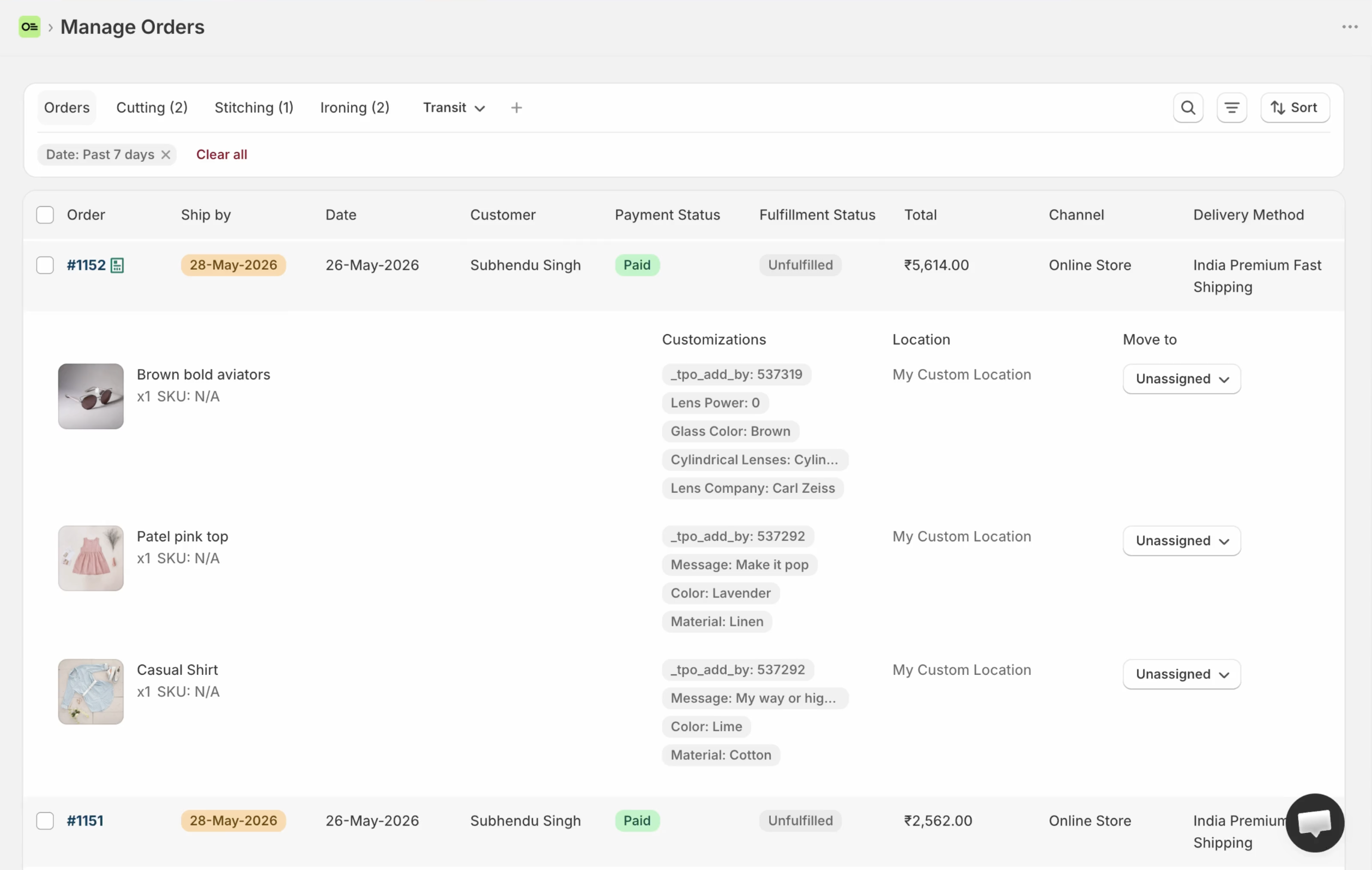
Orderline’s production list: line items, images, customizations, statuses, and ship-by in one place — without opening every order.
Key takeaways
- Tags are free filters on an order. They’re not a production board, and they don’t show line items, images, or personalization on the Orders list.
- On Shopify Community, the free answer for manufacturing steps beyond “unfulfilled” and “fulfilled” is often tags (or an app), because Shopify has no built-in multi-step shop status (thread on manufacturing steps, retrieved 31 July 2026).
- Shopify Flow is strong at automating tags and extra fields. It doesn’t give staff a list they can scan for what to build.
- Orderline can use a ship-by date that Flow writes. Flow and Orderline work together, not only compete (ship-by guide).
- Tags and the Flow app cost no extra app fee. Orderline is $9 / $19 / $39 per billing period with a 7-day free trial (pricing, checked 31 July 2026).
What job are we solving?
This page is only about the day after someone pays for something custom: what to make, which step it’s in, and when it should leave the shop.
It is not about:
- Collecting options on the product page (product options apps still own that job)
- Replacing Shopify payment, refunds, or the official order record
- Building a page where the customer tracks production progress
If the only pain is “I can’t see custom options without clicking into each order,” also read Orderline vs Shopify Orders. This page assumes you already tried tags (and often Flow) as the free fix for stages.
How people use tags and Shopify Flow today
Tags as stand-in status
If you run a custom shop, this pattern needs no introduction. You invent tags like “proof”, “in-production”, “ready-to-ship”, or “waiting-on-customer”. You filter Admin → Orders by tag. Notes catch the one-off exceptions. That’s the free answer Shopify Community gives when people ask for manufacturing steps beyond unfulfilled and fulfilled.
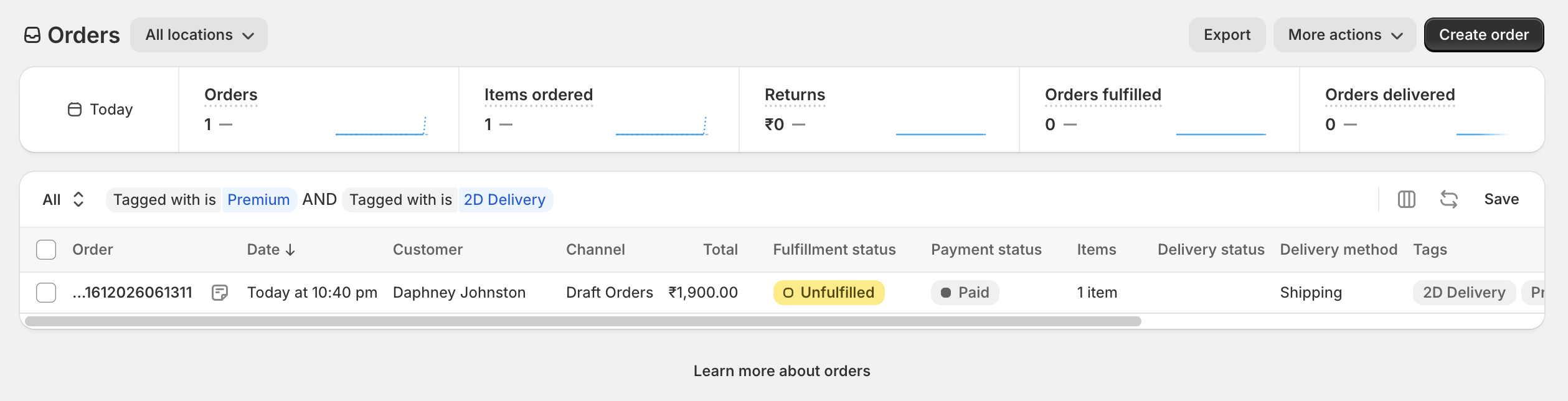
Shopify Orders with tags as labels and filters. Useful for buckets — still not a list of what to make on each line.
It works while:
- You only have a small number of open custom orders
- One person remembers what each tag means
- Opening the order to read personalization is still fine
Flow as the auto-tagger
Shopify Flow is a free app from Shopify (App Store listing, retrieved 31 July 2026). It watches for events in your store and runs a sequence of steps: when something happens, if a condition is true, do an action. Common patterns for custom shops:
- When an order is created, if the product is in a custom collection, add the tag “custom”
- When an order is paid, email or message the maker
- If a line has certain options, add “needs-proof”
- Write an extra order field (a metafield) with a date or batch name so you can find those orders later
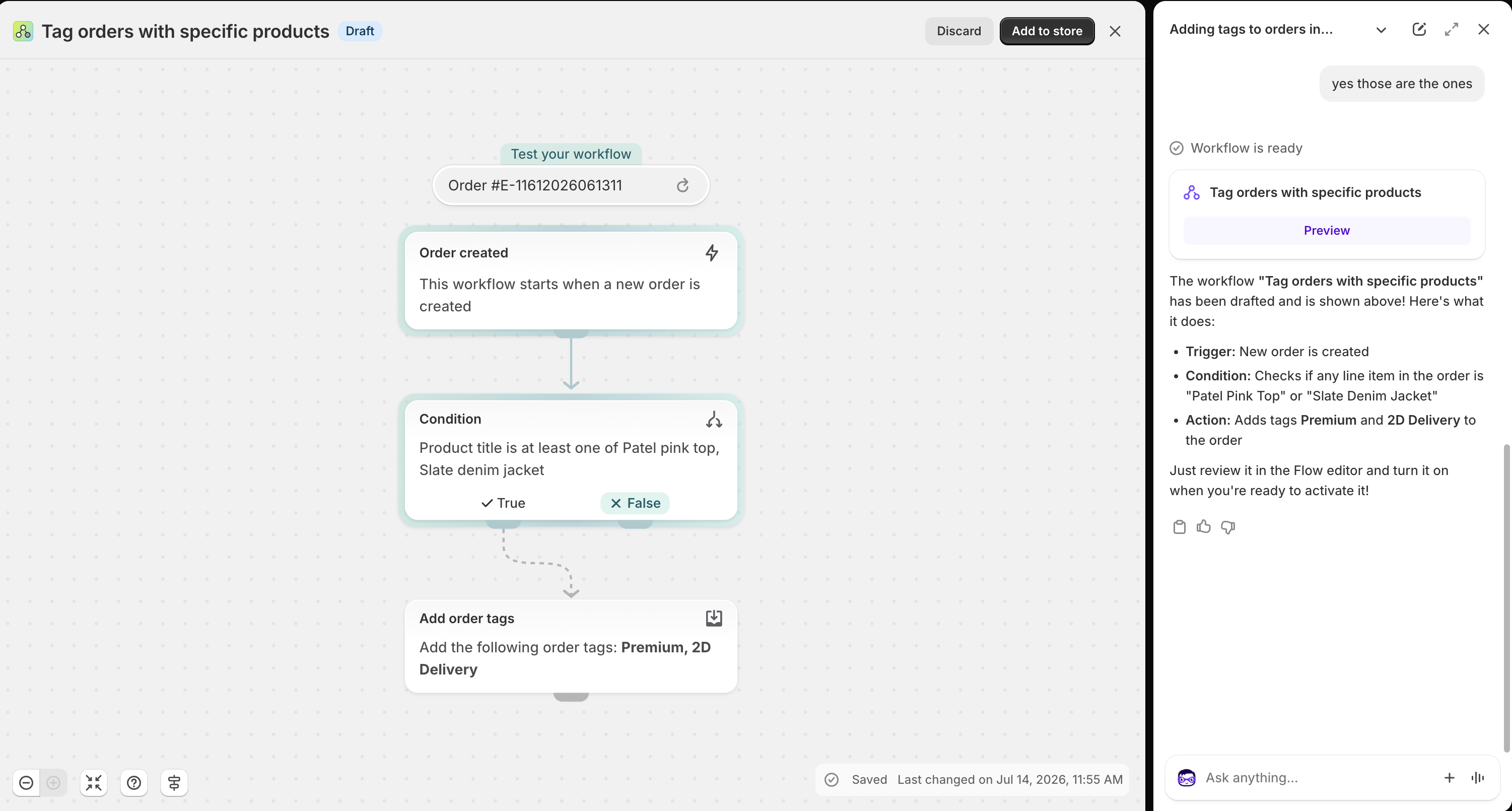
Shopify Flow adding order tags automatically. Strong for labeling — the work list is still Admin → Orders.
Flow is excellent at labeling and routing; it’s not a work screen for the bench. Staff still open the same Shopify Orders list, and what they see there is tag chips — not product images, not engraving text, not a colored stage column built for production.
Why this free stack feels enough for a long time
You don’t pay for a second app. You don’t learn a new login. Automation sits next to the same admin you already use for money. For many shops that’s the right first setup — the same way any simple process works until volume and a second pair of hands make the limits obvious.
Where tags and Flow get painful for custom work
Tags are not structured stages
A tag is a short label on an order. It doesn’t group cleanly under something like “Production → Cutting / Polish.” It doesn’t show a color on a dense work table. Two people can invent “in-prod” and “in_production.” One order can carry three stage tags at once with no single “current step.” Filters help you find labels; they don’t keep a clean pipeline.
Shopify’s built-in fulfillment language stays unfulfilled, fulfilled, partial, and on hold. Community threads still answer “add manufacturing steps” with tags, extra fields, or apps — not a new core status field on the Orders screen (thread on “in progress” for production, retrieved 31 July 2026).
Personalization stays one click deep
Tagging an order “custom” doesn’t put the engraving text, font, or customer upload on the list. Shopify sellers on Reddit still describe the same loop: click each order just to see line items and customizations, even when they care about process (r/shopify discussion, retrieved 31 July 2026). Tags answer “which bucket is this order in?” Images and options answer “what do I make?”
Ship-by and gift delivery day stay improvised
You can tag “due-friday” or put a date in a note. That falls apart when volume rises. Flow can write a real date into an extra order field — that’s useful — but Shopify’s Orders list still doesn’t turn it into a clear Ship By column with urgency and easy sort. For florists, bakeries, and gift shops, running “15 Aug delivery” as a day list is a different job from a single tag.
Automation is not the same as a work list
Flow can add every tag correctly and still leave your team on Shopify’s Orders page — a screen built for taking payment and marking orders fulfilled, not for scanning product images and personalization across a morning of work. The real cost isn’t Flow’s price; the app is free. It’s the hours of open, read, close.
Too many tags pile up
Every exception gets a new tag. Filters get hard to read. New staff need a glossary. Flow rules grow until nobody wants to touch them. That’s no reason to hate Flow — it’s a reason to stop asking tags to be the only place production lives.
Tags and Flow vs Orderline, side by side
| What you need | Tags + Shopify Flow | Orderline |
|---|---|---|
| See line items, images, and custom options without opening every order | Weak — tags label the order; details still inside | Strong — unified orders view |
| Internal production stages in your shop’s words | Tags as stand-in stages; flat filters | Custom statuses, optional groups, colors on the table (statuses guide) |
| Ship-by or “must leave by” on the work list | Notes, tags, or extra fields; no dedicated urgency column on Orders | Ship-by with urgency; automatic rules or dates you set / Flow can write (ship-by guide) |
| Gift delivery day, retailer name, or PO as a daily board | Possible as tags or fields; hard to run as saved day lists | Custom columns and saved views (columns, views) |
| Automate labels and date fields | Strong — that’s Flow’s job | Doesn’t replace Flow; can show a ship-by date Flow writes |
| Keep everything inside Shopify without retyping orders elsewhere | Yes — tags and Flow stay in Admin | Yes — Orderline is an embedded app; payment stays in Shopify Admin |
| Customer emails about “where is my order?” after shipping | Not what tags alone are for | Not Orderline’s main job |
| Bills of materials and factory materials planning | No | No — use manufacturing software if that is the real need |
| Fulfill, pack, buy labels from the same work list | Mark fulfilled on Orders; printers often separate | Fulfill from Orderline with sync, packing slips, optional Shippo labels |
| Quotes as draft orders before payment | Drafts plus tags if you invent them | Drafts board with its own statuses |
| Money cost | Tags free; Flow app free (your Shopify plan still applies) | Starter $9, Pro $19, Pro+ $39 per period; 7-day trial (pricing, 31 July 2026) |
| Time to start | Already there if you use Admin | Install and open the list; add stages when you’re ready |
Orderline does not add stage columns to Shopify’s own Orders table. Tags can still help for Admin filters, reports, and Flow conditions after you adopt Orderline.
How they work together
You don’t have to throw tags and Flow away.
- Keep Flow for events: new custom product ordered → notify a channel, add a coarse tag, or write a ship-by date into Orderline’s date field when you use merchant-managed ship-by (the field name in Shopify is
orderline.ship_by, a date like 2026-08-15). - Run the day in Orderline: scan lines and options, move internal stages, sort by ship-by urgency, save views such as “15 Aug delivery” or a retailer name.
- Keep Shopify Admin for payment, refunds, risk checks, and the official order.
- Optional: keep a few simple tags for Admin search or exports — not as your only stage model.
That’s different from typing every order into a spreadsheet or a project board outside Shopify. Flow can write a date or a label; Orderline is where the team sees the work and acts. Step-by-step for the date field is in the ship-by deadlines guide.
If you already live on tags, a calm first week looks like this:
- Install Orderline and confirm you can see images and options without opening each order.
- Turn your three to seven real tags into named statuses (with colors). Drop the rest.
- Turn on ship-by if deadlines matter — automatic from shipping rules, or dates you set / Flow writes.
- Add one column you already use (delivery date, purchase order number, or retailer).
- Keep Flow automations that still help. Stop treating tags as the only place stages “live.”
When tags and Shopify Flow are enough
Stay on tags and Flow when most products are simple, open custom volume is small enough for one person, tags stay few and everyone agrees what they mean, and opening orders for personalization is still acceptable. Stay here too when Flow’s real win is a notification or a back-office label — not a multi-person shop floor list.
Choose a different kind of software (not more tags, and not Orderline as the wrong fit) when you need full materials and manufacturing orders as the heart of the business, or when the main pain is automatic customer updates about production steps. Those are different jobs.
When Orderline is the wrong buy (fair)
Orderline is a poor fit if:
- You only needed one automated message from Flow and never needed a clearer list
- Your real problem is customer-facing order progress messages, not a staff work list
- You won’t pay for any ops app and will accept opening every order forever
- You need a general project tool for marketing and files more than a Shopify-connected order list
Tags and Flow win on no extra app cost and automation inside Shopify. Orderline wins on seeing the work and running stages next to Admin.
Common questions
Do I have to delete my tags if I install Orderline?
No. Tags can stay for Admin filters, Flow rules, and exports. Day-to-day production stage should live on Orderline statuses, so the team has one clear place for “where is this order in the shop?”
Can Shopify Flow replace Orderline?
No. Flow runs actions when events happen. It doesn’t give makers a single screen with line items, images, personalization, stage colors, and ship-by urgency.
Can Flow and Orderline work together?
Yes. A common pattern is Flow writing the ship-by date field Orderline reads, while Orderline shows urgency and sort. Tags can still be conditions in those Flow workflows.
Are Orderline statuses the same as Shopify tags?
No. Tags are free-form labels on the Shopify order. Orderline statuses are your internal production steps on Orderline’s board — and they’re separate from Shopify’s fulfillment status (unfulfilled, fulfilled, and related states).
Will Orderline turn my existing tags into statuses automatically?
You map the real pipeline yourself — usually a short list. That cleanup helps: many shops discover they had a dozen tags and only four real stages.
What does this cost compared with free tags?
Tags and the Flow app are free (your Shopify plan still applies). Orderline runs $9 to $39 per billing period depending on volume and staff access, with a 7-day trial — pricing has the live numbers. Confirm on the App Store before you subscribe.
What to do next
If tags and Flow already label the work but your team still opens every custom order to see what to make, try the list first — then move stages when the day needs them.
- Install Orderline (7-day trial)
- Pricing
- Who it’s for
- Related: Orderline vs Shopify Orders · Orderline vs Google Sheets · How to manage custom orders (tags, drafts, packing slips) · Ship-by deadlines (including Flow)
Sources (retrieved 31 July 2026)
- Shopify Help, Shopify Flow — https://help.shopify.com/en/manual/shopify-flow
- Shopify App Store, Shopify Flow — https://apps.shopify.com/flow
- Shopify Help, Orders — https://help.shopify.com/en/manual/orders
- Shopify Community, manufacturing workflow steps — https://community.shopify.com/t/how-to-add-additional-fulfillment-status-for-manufacturing-process-steps/253013
- Shopify Community, custom in-progress status — https://community.shopify.com/t/shopify-app-order-make-in-progress/588473
- Shopify sellers on Reddit (r/shopify), line items and customizations on the list — https://www.reddit.com/r/shopify/comments/1rilj4m/seeking_advice_on_a_custom_order_management/
- Orderline product truth —
context/about-orderline.mdand live guides - Orderline pricing — https://orderlinehq.com/pricing
- Related compare —
/compare/shopify-orders