Compare · Orderkraft
Orderline vs Orderkraft for made-to-order Shopify orders
Orderkraft adds manufacturing orders and lead times on Shopify; Orderline is the staff personalization queue. When materials software vs a work list wins.
Who this is for
Shopify sellers who make products to order and found Orderkraft while shopping for a way to run production. Its pitch — work orders, bills of materials, live lead times on your product pages — sounds like the whole answer. This page helps you figure out whether you need that depth, or whether a production queue like Orderline is the actual fit.
Who this isn’t for: Teams whose main need is multi-warehouse inventory software or customer tracking pages after a parcel ships. Neither app here is built for those jobs.
We build Orderline, so we’re not neutral here — read the “when Orderkraft is the right buy” section as critically as the rest.
The short answer: Orderkraft and Orderline both serve made-to-order shops, but at different depths. Orderkraft turns orders into work orders with materials and bills of materials behind them, and pushes live lead times to your product pages — it’s a manufacturing system of record. Orderline is the bench’s daily driver — a production queue inside Shopify: every open order on one list with images, customizations, internal stages, and ship-by urgency, then fulfill from the same screen. If your pain is materials, component stock, and customers seeing honest lead times at checkout, Orderkraft is built for that. If your pain is the morning — what do we make, in what stage, by when — Orderline is the lighter, cheaper, faster answer. One flag as of 31 July 2026: Orderkraft’s listing shows zero reviews, so treat it as an early product and trial it carefully.
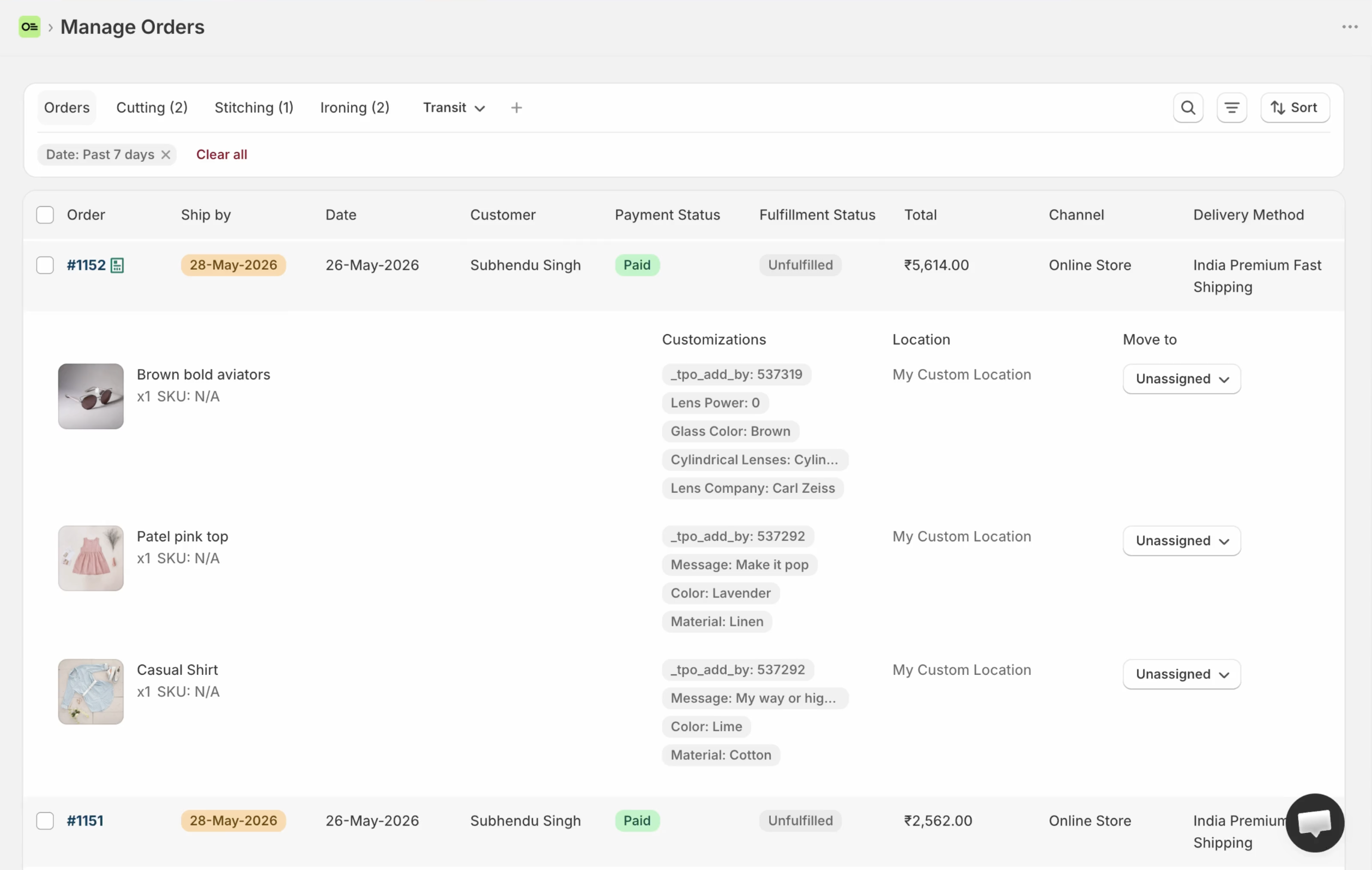
Orderline’s production queue: the daily list for personalized orders — a different depth than Orderkraft’s work orders and materials.
Key takeaways
- Orderkraft = manufacturing system of record: orders become work orders, with materials/components tracking, bills of materials, and fulfillment control (App Store listing, 31 July 2026).
- Its standout feature is product-page lead times calculated from production and supplier time — a storefront promise Orderline doesn’t make.
- Orderline = production queue: line-item images and customizations on one list, internal stages, ship-by urgency, fulfill/pack/labels in one place.
- The price bands reflect the depth difference: Orderkraft from $69/mo plus $0.30 per completed order; Orderline $9 / $19 / $39 per period with a 7-day trial (pricing, checked 31 July 2026). Fit first, price second.
- Orderkraft had zero App Store reviews on 31 July 2026 — an early listing. Re-check before you subscribe.
What each product is optimized for
Orderkraft answers: what goes into making this, and when can we honestly promise it? Orders become work orders. Materials and components sit behind every product in a bill of materials. Made-to-order items stay out of your warehouse flow until produced, while stocked lines ship early. And the feature nothing else in this category matches: lead times on your product pages that update when production or supplier times change.
Orderline answers: what does the team make today, and in what order? It’s the screen the team opens first and keeps open all day. The production list shows every open order with product images and the customer’s exact customizations, so nothing gets made wrong from a missed detail. Stages are yours to name, ship-by knows what’s late, and when the work is done you fulfill, print, and buy labels without leaving the screen. No materials planning — deliberately.
Same search intent, different system of record
People find both apps with the same words — “made to order” — while describing two different failures.
If the failure is upstream — you don’t know your component stock, your lead times are guesses customers shouldn’t trust, work orders live in someone’s notebook — you need a system of record for manufacturing. That’s Orderkraft’s job, and a queue won’t fix it.
If the failure is the daily list — customizations buried one click deep, no real stages, no ship-by on the list, staff opening every order all morning — you need a production queue. That’s Orderline’s job, and a work-order system is heavier than the problem.
Buy for the failure you actually have. The wrong depth in either direction is money for no relief.
Orderkraft vs Orderline, side by side
| What you need | Orderkraft | Orderline |
|---|---|---|
| See line items, images, and customizations on one staff list | Manufacturing-order queue claimed; personalization images/options on that list not claimed (orderkraft.com, App Store, 1 Aug 2026) | Strong — unified orders view |
| Orders become work orders | Strong — that’s the product | No — Orderline tracks the order, not a work order |
| Bills of materials / materials & components | Strong | No — use manufacturing software if that is the real need |
| Lead times on product pages | Strong — from production + supplier time, updating live | No |
| Internal production stages for staff | Work-order/production framing | Custom statuses, optional groups, colors (statuses guide) |
| Ship-by urgency on the daily list | Product-page lead times + manufacturing order timing (“by when”) — different job from a staff Ship By urgency column (App Store + orderkraft.com, 1 Aug 2026) | Ship-by with urgency; automatic rules or dates you set / Flow can write (ship-by guide) |
| Hold made-to-order items out of warehouse flow; ship stocked lines early | Strong — fulfillment control | No — Orderline works at the order-queue level |
| Fulfill, pack, buy labels from the work surface | Fulfillment control + release for fulfillment when production completes (listed). Packing slips / carrier labels not claimed on App Store or orderkraft.com (1 Aug 2026) | Fulfill from Orderline with sync, packing slips, optional Shippo labels |
| Quotes as draft orders before payment | No Shopify draft-order quote board claimed. “Draft” on manufacturing-order statuses is production-side, not Admin drafts (orderkraft.com screenshot alt, 1 Aug 2026) | Drafts board with its own statuses |
| Track record | 0 reviews on 31 July 2026 — early listing | Younger category, established app — judge on the trial |
| Money cost | From $69/mo + $0.30 per completed order (14-day trial) | Starter $9, Pro $19, Pro+ $39 per period; 7-day trial (pricing, 31 July 2026) |
| Time to start | Model products, BOMs, lead times | Install; the list works day one |
Feature reality check
Everything claimed about Orderkraft here comes from its App Store listing, fetched 31 July 2026:
- “Orders become work orders” — with fulfillment control for made-to-order vs stocked lines
- Materials and component tracking; bills of materials
- Product-page lead times (via a theme extension) from production time plus supplier delivery, updating when either changes
- Keeps made-to-order products out of warehouse flow until produced; ship ready items early
- Works with Checkout, Shopify Flow, Downpay
- Starter includes email support; higher tiers add Slack support, priority support, and an account manager
What Orderkraft’s public pages do not claim (checked 1 Aug 2026): a staff production list with line-item personalization, packing slips or carrier labels, and a Shopify draft-quotes board — their “draft” status belongs to manufacturing orders, not Admin quotes. The standing caution stays: zero reviews on fetch day. Trial with real products before the shop depends on it.
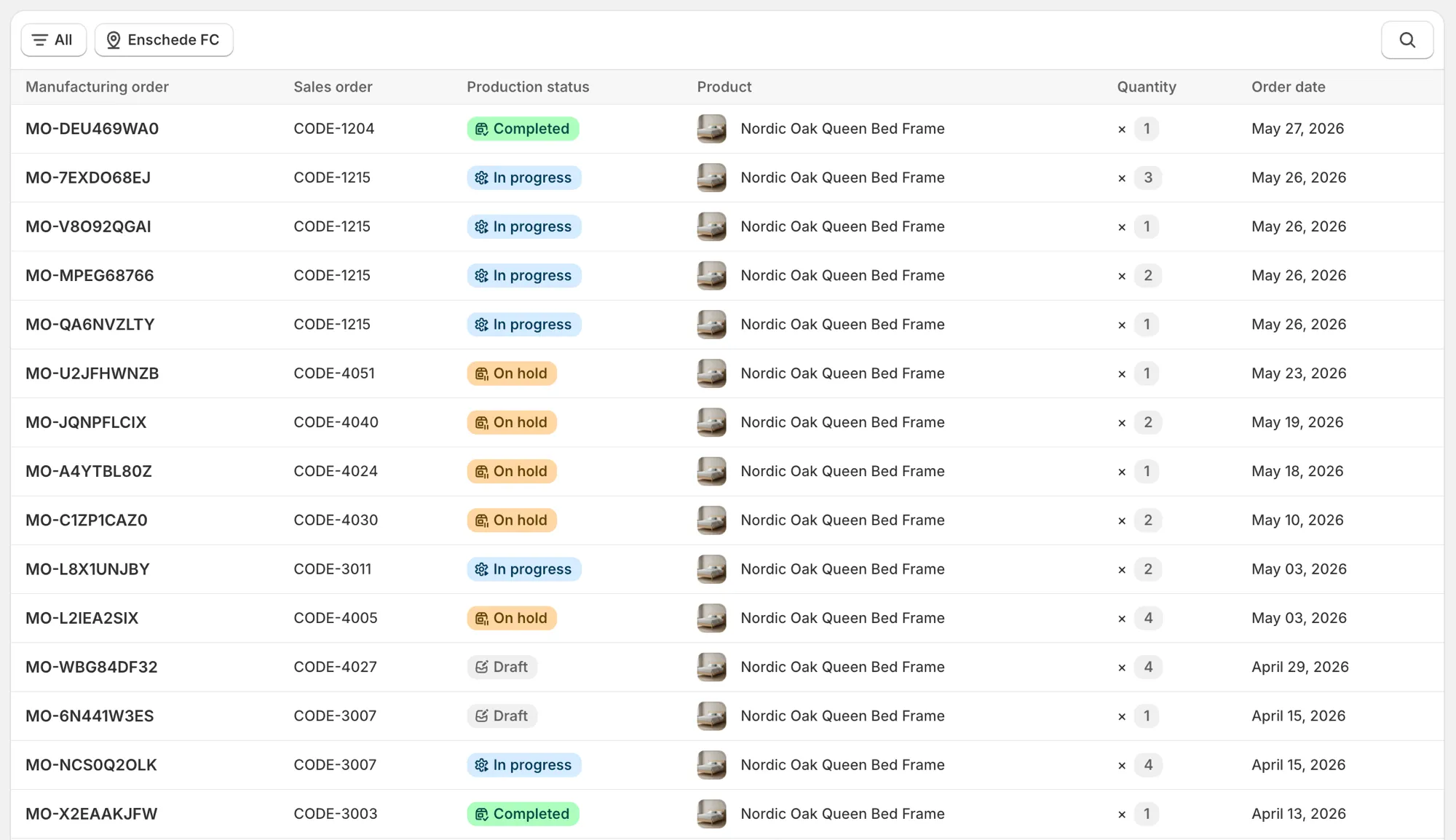
Orderkraft manufacturing orders queue (orderkraft.com). Production work orders with materials and lead times — not a personalization scan list.
Pricing comparison (checked 31 July 2026 — confirm live on publish day)
| Tier | Orderkraft | Orderline |
|---|---|---|
| Entry | $69/mo + $0.30 per completed order — BOM, materials, lead-time widget, fulfillment control | $9/period — Starter |
| Mid | $149/mo + $0.17 per completed order | $19/period — Pro |
| Upper | $359–$699/mo + $0.08–$0.04 per completed order | $39/period — Pro+ |
| Trial | 14-day | 7-day |
The bands don’t really overlap, and that’s the point: Orderkraft is priced like a manufacturing system (and its per-order fee scales with your success), Orderline like an ops utility. At 500 completed orders a month, Orderkraft’s Starter lands around $219; Orderline’s top plan is $39. Different buys for different failures — just run the math on your volume before assuming either way.
Best for / not for
| Orderkraft | Orderline | |
|---|---|---|
| Best for | Makers who need BOMs, component stock, and honest live lead times on the storefront; shops ready for a manufacturing system of record, not just a queue | Personalized-product shops whose pain is the daily list — images, customizations, stages, ship-by, fulfill |
| Not for | A cheap, fast staff queue (it’s deeper and pricier by design); anyone needing a proven listing today (0 reviews) | Materials/BOM; PDP lead times; warehouse-flow control |
Can you use both?
In principle, yes: Orderkraft as the manufacturing record (materials, work orders, lead times), Orderline as the staff’s daily queue. In practice, most shops should pick by which failure hurts first — running two production systems asks for the same double-entry discipline we warn about on the Google Sheets comparison. If you genuinely need both depths, keep the boundary sharp: materials and promises in one, the morning queue in the other.
When Orderkraft is the right buy
Pick Orderkraft when your problem is genuinely manufacturing, not visibility: when “what’s our lead time?” is a question your storefront should answer live, when component stock decides what you can sell, when work orders need materials behind them. That’s a real system-of-record need, and Orderline deliberately doesn’t touch it. Just go in eyes open about the early listing — zero reviews as of 31 July 2026 — and trial it against real products before committing the shop.
Common questions
Does Orderline do bills of materials or component tracking?
No — deliberately. If materials, recipes, or component stock are the system of record you need, that’s manufacturing software: Orderkraft on the App Store, or maker-MRP tools like Stocksmith and Katana.
Can Orderline show lead times on my product pages?
No. Orderline’s ship-by is an internal urgency column for your team, calculated from your shipping rules or set by you. Orderkraft’s lead-time widget is a storefront promise to customers — different job.
Is Orderkraft proven?
Not yet, by public evidence: zero App Store reviews on 31 July 2026. That’s normal for a new listing, not a red flag by itself — but trial it with real products, and re-check the listing before you subscribe.
Which is better for a two-person custom shop?
Usually the queue: the daily pain at that size is reading orders and knowing what’s due, not modeling materials. Orderline installs and works the same day. If you’re already turning away orders because lead times are unknowable, that’s the Orderkraft-shaped problem.
What does this cost compared with Orderline?
Orderkraft starts at $69/mo plus $0.30 per completed order (14-day trial). Orderline runs $9 to $39 per period with a 7-day trial — pricing has the live numbers (checked 31 July 2026). Fit first; then run the per-order math at your volume.
What to do next
If materials and honest lead times are the gap, Orderkraft’s 14-day trial answers it with your real catalog. If the gap is the production morning — try ours.
- Install Orderline (7-day trial)
- Pricing
- Who it’s for
- Related: Orderline vs Stocksmith (Craftybase) · Orderline vs Katana · Orderline vs Shopify Orders · Ship-by deadlines
Sources (retrieved 31 July 2026)
- Orderkraft: made to order, Shopify App Store listing (pricing, features) — https://apps.shopify.com/orderkraft
- Peer tools research packet —
apps/growth/compare/research/peer-tools-research-2026-07-31.md(§3.5) - Orderline product truth —
context/about-orderline.mdand live guides - Orderline pricing — https://orderlinehq.com/pricing