
Compare · W3 Custom Order Status
Orderline vs W3 Custom Order Status for made-to-order Shopify orders
W3 Custom Order Status handles customer email, SMS, and branded lookup; Orderline is the staff queue. When to pick one, the other, or both.
Who this is for
Shopify sellers who make custom or made-to-order products and are weighing W3 Custom Order Status against Orderline. W3 speaks your language — its own marketing names print shops, furniture makers, and custom goods — so the choice deserves a careful answer: which job do you actually need done?
Who this isn’t for: Teams whose main need is multi-warehouse inventory software, full factory materials planning, or carrier tracking after a parcel ships. Neither app here is built for those jobs.
We build Orderline, so we’re not neutral here — read the “when to pick W3” section as critically as the rest.
The short answer: W3 Custom Order Status is the veteran of this category — running since 2016, with unlimited custom statuses, email and SMS updates, a branded customer lookup page, bulk updates, and QR workstation scanning. Its center of gravity is telling your customer where the order is, in production language they understand. Orderline’s center of gravity is telling your team what to make next: line-item images and customizations on one list, internal stages, ship-by urgency, and fulfill from the same screen. If anxious customers are the pain, W3 is a legitimate, proven choice. If the production morning is the pain, that’s Orderline.
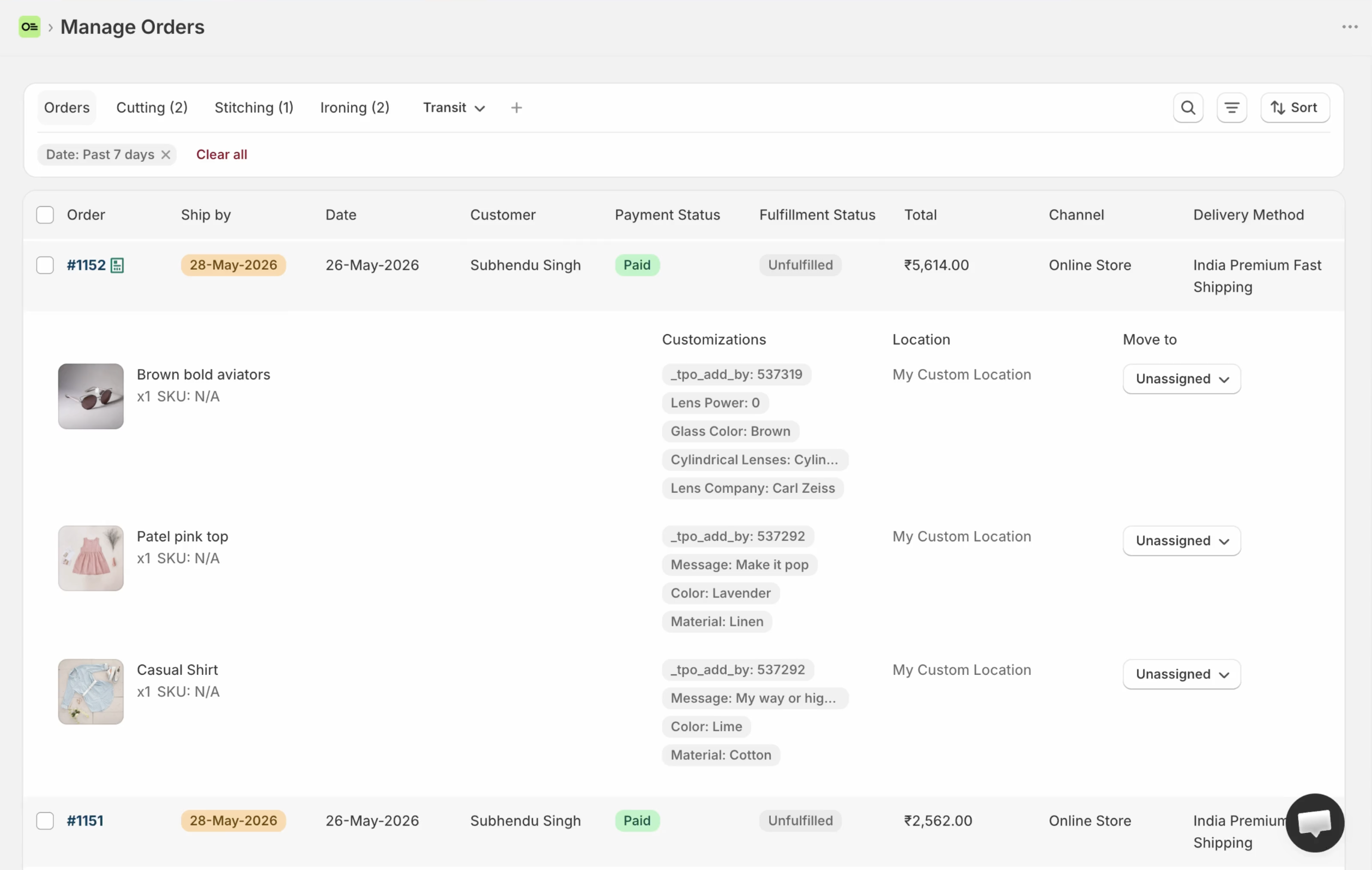
Orderline’s staff-facing production list — built for the bench, where W3 is built for the buyer.
Key takeaways
- W3 Custom Order Status has operated since 2016 and holds 4.7★ from 54 reviews (App Store, 31 July 2026). It’s the status app the Shopify Community recommends for manufacturing steps (thread, retrieved 31 July 2026).
- Its verified strengths are customer-facing: unlimited statuses, email and SMS alerts, a branded lookup page, bulk updates, QR scanning (App Store listing, 31 July 2026).
- Orderline is the staff-facing counterpart — the team’s daily work list: line-item images and customizations on one list, internal stages, ship-by urgency, fulfill and packing from the same screen.
- W3 starts at $19/mo (300 active orders; SMS billed extra) with a 14-day trial; Orderline is $9 / $19 / $39 per period with a 7-day trial (pricing, checked 31 July 2026).
- Using both is legitimate: W3 tells the customer, Orderline runs the shop floor.
What each product is optimized for
W3 Custom Order Status is built around the buyer’s question: what’s happening with my order? You define statuses in your production language — its own examples are Design, Production, QA, Shipped — and the app emails or texts customers as orders move, with a branded page where they can check anytime. It’s been doing exactly this since 2016, and its listing speaks directly to custom goods, print shops, and furniture makers.
Orderline is built around the team’s question: what do we make, in what order, by when? The production list shows every open order with product images and the customer’s exact customizations, stages in your shop’s words, a ship-by column that knows what’s late, and fulfillment from the same screen. It’s where the team spends its working day — every job’s stage at a glance, every customer’s choices on the row — while customers never see it.
W3 vs Orderline, side by side
| What you need | W3 Custom Order Status | Orderline |
|---|---|---|
| See line items, images, and customizations without opening every order | No — marketed as custom statuses + customer email/SMS + branded lookup/dashboard, not a line-item image list (W3 site, App Store, retrieved 1 Aug 2026) | Strong — unified orders view |
| Internal production stages for staff | Unlimited custom statuses; listing centers customer updates | Custom statuses for staff, optional groups, colors (statuses guide) |
| Customer emails when status changes | Strong — customizable templates | Not Orderline’s main job |
| Customer SMS updates | Yes — Growth plan; per-message charge | No |
| Customer lookup page | Strong — branded, embeddable | No |
| Due dates / ship-by for staff | No public claim of a staff ship-by or due column (StatusPro lists due dates; W3 public pages do not, retrieved 1 Aug 2026) | Ship-by with urgency; automatic rules or dates you set / Flow can write (ship-by guide) |
| Bulk status updates | Yes — plus QR workstation scanning | Yes — bulk moves on the list |
| Fulfill, pack, buy labels from the work list | No — not listed (statuses, email/SMS, lookup, bulk status; App Store + W3 site, 1 Aug 2026) | Fulfill from Orderline with sync, packing slips, optional Shippo labels |
| Quotes as draft orders before payment | No — no draft-order quote board claimed on App Store or vendor site (retrieved 1 Aug 2026) | Drafts board with its own statuses |
| Bills of materials and factory planning | No | No — use manufacturing software if that is the real need |
| Track record | Since 2016; 4.7★, 54 reviews (31 July 2026) | Younger — judge us on the trial |
| Money cost | $19/mo (300 active orders) or $59/mo (5,000); SMS extra; 14-day trial | Starter $9, Pro $19, Pro+ $39 per period; 7-day trial (pricing, 31 July 2026) |
Feature reality check
Everything claimed about W3 on this page comes from its App Store listing and vendor site, fetched 31 July 2026:
- Unlimited custom order statuses for any workflow, with email and SMS alerts
- Branded order lookup form, embeddable status on your order lookup page
- Bulk order updates and QR workstation scanning
- API, webhooks, workflow automation, and multilingual notification templates on the Growth plan
- “Original Order Status App for Shopify (Since 2016)” — vendor site
- Named by merchants in the Shopify Community thread on manufacturing workflow steps
- Review texture worth knowing: long-term users praise the reliability; at least one visible review notes “manual entry, but worth it” — set-up takes some work
What the listing does not show: a staff production list with line-item images and customizations, packing slips, or shipping labels.
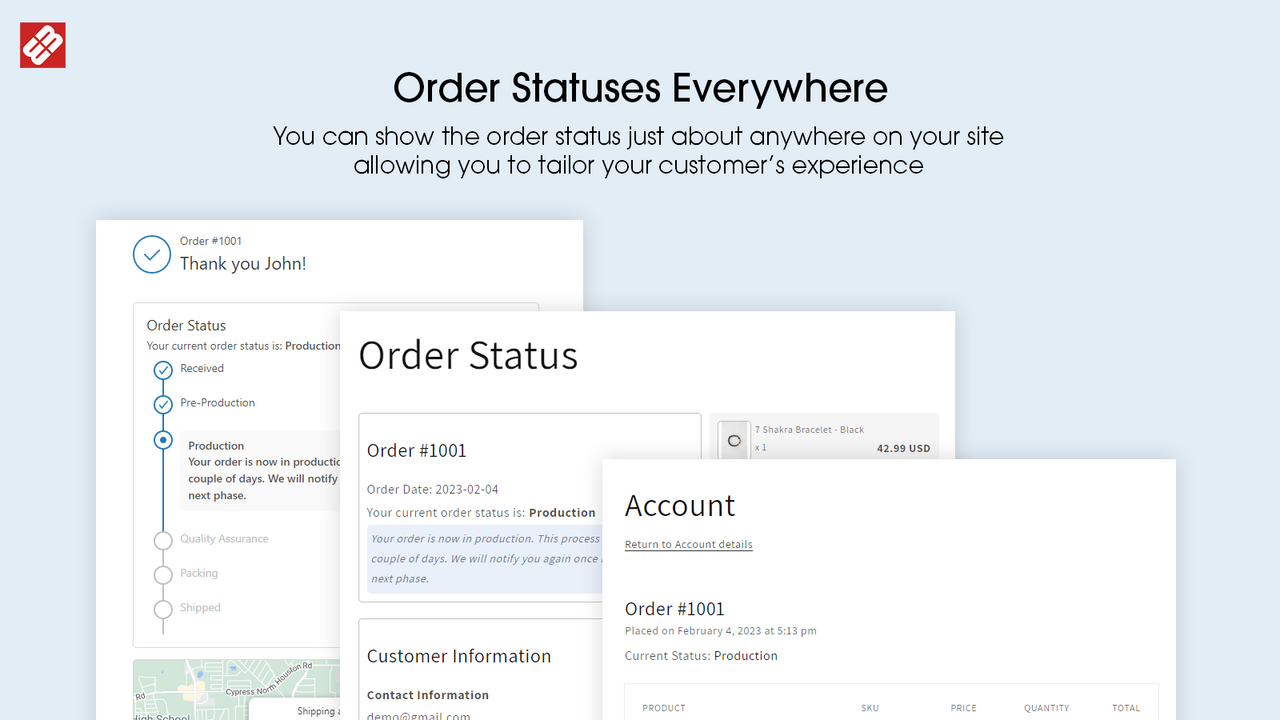
W3 branded status surfaces customers see (public App Store listing). Complement, not a staff image-rich queue.
Pricing comparison (checked 31 July 2026 — confirm live on publish day)
| Tier | W3 Custom Order Status | Orderline |
|---|---|---|
| Entry | $19/mo — 300 active orders, unlimited statuses, branded lookup, bulk updates (SMS billed per message) | $9/period — Starter |
| Upper | $59/mo — 5,000 active orders, user accounts, SMS, API/webhooks, automation, multilingual templates | $19–$39/period — Pro / Pro+ |
| Trial | 14-day | 7-day |
W3’s tiers scale by active orders; Orderline’s by volume and staff access. And remember the prices buy different jobs — W3’s $19 buys customer peace of mind, Orderline’s $9 buys a production morning that runs itself.
Best for / not for
| W3 Custom Order Status | Orderline | |
|---|---|---|
| Best for | Custom shops whose customers wait weeks and ask for updates; teams wanting SMS; shops that value a vendor with a decade of history | Shops where the failure is staff visibility — customizations buried in orders, no real stages, no ship-by on the list |
| Not for | A staff production board with line detail; packing/fulfillment | Customer-facing progress pages or SMS; post-ship tracking |
Can you use both?
Yes, and it’s a clean split: Orderline runs the inside of the shop — the queue, the stages, the deadlines — while W3 keeps the customer informed in your production language. If you can only start with one, start with whichever pain is louder: the team asking “what do we make?” or the customers asking “where is my order?”
When to pick W3 anyway
Pick W3 when customer communication is the job and you want a specialist that’s done it since 2016 — especially if SMS matters to your buyers. Its community reputation in made-to-order circles is earned; the same merchants who ask for manufacturing statuses on Shopify’s forums get pointed to it. Orderline doesn’t send your customers a single email, and for some shops that’s exactly the gap.
Common questions
Does Orderline do customer notifications like W3?
No — customer-facing progress isn’t Orderline’s job. Orderline is the staff queue; W3 (or a similar app) is the customer voice. They pair well.
Can W3 show my team engraving text and product images on one list?
No — W3’s surface is statuses, email/SMS, and the branded customer lookup page (App Store and W3 site, checked 1 Aug 2026). A staff list of line-item images and customizations is Orderline’s core job.
W3 has SMS. Does Orderline?
No. If texting customers matters, that’s a real W3 advantage (billed per message on its plans).
Is W3’s “production status” the same as Orderline’s production statuses?
Same words, different audience. W3’s statuses drive customer emails, SMS, and lookup pages. Orderline’s statuses organize the staff work list, with colors and groups, separate from Shopify’s fulfillment states.
What does this cost compared with Orderline?
W3 starts at $19/mo for 300 active orders (SMS extra); Orderline runs $9 to $39 per billing period with a 7-day trial — pricing has the live numbers (checked 31 July 2026).
What to do next
If customers are the ones asking for statuses, try W3’s 14-day trial. If it’s your team asking, try ours.
- Install Orderline (7-day trial)
- Pricing
- Who it’s for
- Related: Orderline vs StatusPro · Orderline vs tags and Shopify Flow · Custom production statuses
Sources (retrieved 31 July 2026)
- W3 Custom Order Status, Shopify App Store listing (rating, pricing, features) — https://apps.shopify.com/ultimate-order-status
- W3 vendor site (“Since 2016”, plan details) — https://www.orderstatus.w3apps.co/
- Shopify Community, manufacturing workflow steps (W3 named by merchants) — https://community.shopify.com/t/how-to-add-additional-fulfillment-status-for-manufacturing-process-steps/253013
- Peer tools research packet —
apps/growth/compare/research/peer-tools-research-2026-07-31.md(§3.3) - Orderline product truth —
context/about-orderline.mdand live guides - Orderline pricing — https://orderlinehq.com/pricing