Compare · FlowDeck
Orderline vs FlowDeck for made-to-order Shopify orders
FlowDeck is a Kanban board for Shopify orders; Orderline is a glanceable production list with line items and customizations. Honest side-by-side.
Who this is for
Shopify sellers who make or personalize products after payment and want orders on a visual board — cards moving through stages. You’re comparing FlowDeck’s drag-and-drop Kanban with Orderline’s dense production list, and you want an honest read on which fits your shop floor.
Who this isn’t for: Teams whose main need is multi-warehouse inventory software, full factory materials planning, or customer tracking pages after a parcel ships. Neither app here is built for those jobs.
We build Orderline, so we’re not neutral here — and because FlowDeck is the closest thing to a head-to-head peer in this category, we’ve tried to be extra careful with the fair-loss rows.
The short answer: FlowDeck and Orderline solve the same problem — giving your team a live view of orders moving through production — with two different shapes. FlowDeck is a Kanban board: drag cards across columns, set work-in-progress limits, watch SLA countdowns, automate from Shopify events, ping Slack. Orderline is a dense production list: every open order on one table with product images, the customer’s exact customizations, stage colors, and ship-by urgency — plus packing slips and labels from the same screen. Pick FlowDeck if your team thinks in cards and columns. Pick Orderline if makers need to read fifty orders’ worth of detail at a glance. One caution as of 31 July 2026: FlowDeck launched in May 2026 and shows a single review, so treat it as promising rather than proven.
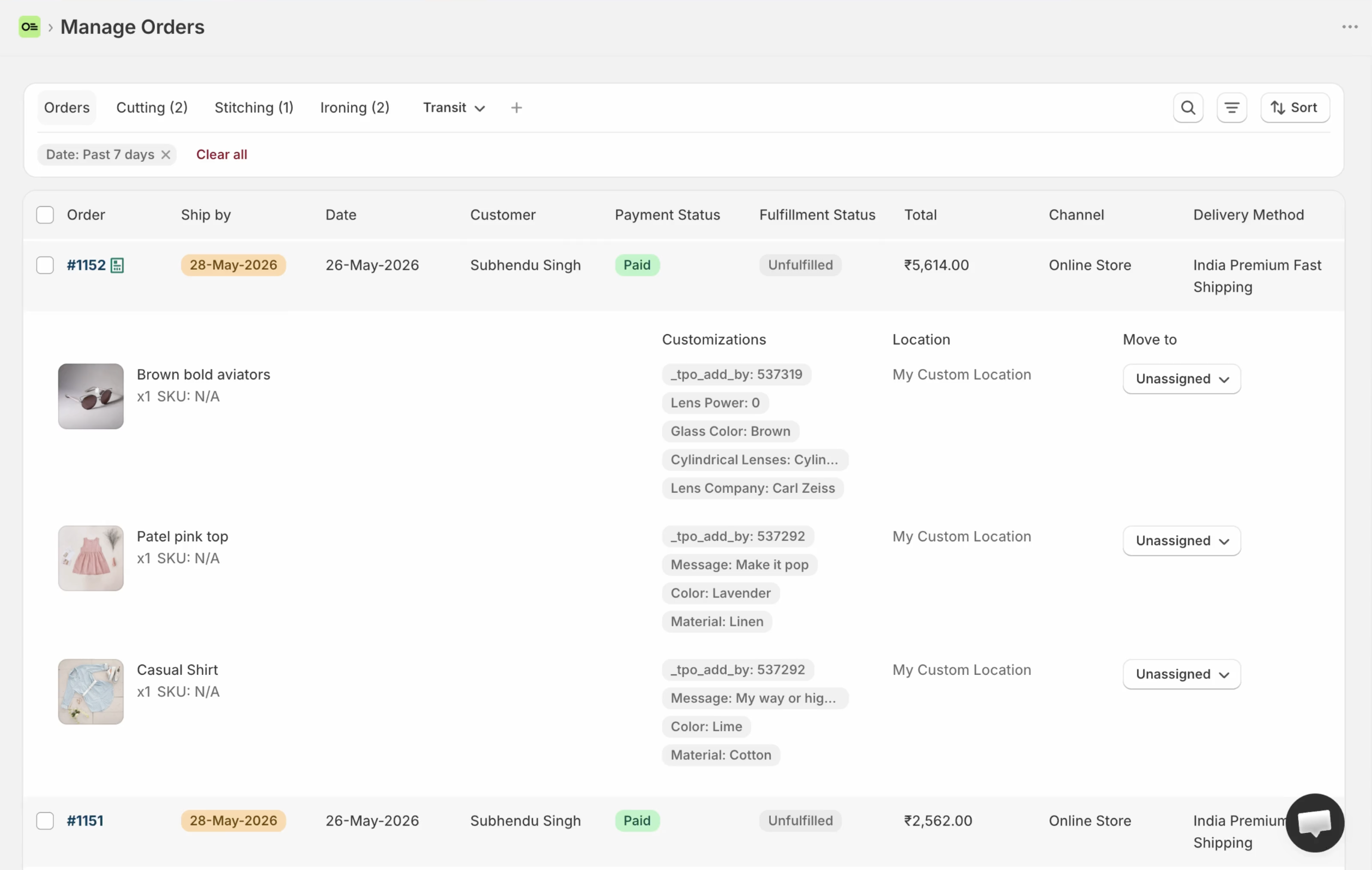
Orderline’s production list: built for scanning fifty orders of detail at once — the table counterpart to FlowDeck’s cards.
Key takeaways
- Same job, different shape: FlowDeck = orders as Kanban cards with drag-and-drop, WIP limits, and SLA countdowns; Orderline = orders as rows in a dense table with line-item images and customizations on every row (App Store listings, 31 July 2026).
- FlowDeck is new: launched May 2026, one review on 31 July 2026. Verify the live listing before committing — new apps change fast.
- FlowDeck’s listing makes no claim that cards show line-item images and customization text — “cards reflect order state in real time” is the pitch (checked 1 Aug 2026). If your makers read engraving strings all day, study the listing screenshots carefully.
- FlowDeck has a genuine free plan (1 board, 50 orders/mo); Orderline is $9 / $19 / $39 per period with a 7-day trial (pricing, checked 31 July 2026).
- Orderline carries the end of the job — bulk packing slips, optional Shippo labels, a drafts pipeline — which FlowDeck’s listing doesn’t claim.
What each product is optimized for
FlowDeck turns Shopify orders into cards on a drag-and-drop board. You build columns for production, fulfillment, returns, or wholesale; set work-in-progress limits so bottlenecks show; watch SLA countdowns on cards; automate moves from Shopify events; and keep the team in Slack with comments and @mentions. It’s the ops-board philosophy: visualize flow, limit work in progress, and let automation do the shuffling.
Orderline is the read-and-work philosophy: one dense table where every open order shows its product images, line items, and customizations, so a maker can scan the whole morning without opening anything. The details a card can’t carry — the engraving string, the exact shade — sit on the row, which is how missed customizations stop reaching customers. Stages are named and colored, ship-by urgency sorts the day, and when the physical work is done, packing slips, fulfillment, and labels happen in the same place.
FlowDeck vs Orderline, side by side
| What you need | FlowDeck | Orderline |
|---|---|---|
| See line items, images, and customizations at a glance | No public claim of line-item images or personalization on cards — listing: “Cards reflect order state in real time” (FlowDeck App Store, 1 Aug 2026) | Strong — unified orders view, every row shows detail |
| Internal production stages | Strong — custom columns per board | Custom statuses, optional groups, colors (statuses guide) |
| Move work by dragging | Strong — that’s the interface | Not drag-rank — sort by ship-by, date, filters |
| Deadline awareness | SLA countdowns on cards | Ship-by with urgency; automatic rules or dates you set / Flow can write (ship-by guide) |
| Automation from Shopify events | Strong — rules, plus Slack notifications | Doesn’t replace Flow; consumes ship-by via orderline.ship_by |
| Bottleneck / flow analytics | Strong — WIP limits, SLA compliance, team activity, CSV | Filters and saved views, not flow analytics |
| Team collaboration | Comments, @mentions, roles, seats per plan | Staff access with location limits on higher plans |
| Multiple boards (production / returns / wholesale) | Strong — separate boards per tier | Orders + one drafts board with its own statuses |
| Fulfill, pack, buy labels from the work surface | No public claim of packing slips or carrier labels (Kanban + SLA + automation + Slack; App Store, 1 Aug 2026) | Fulfill from Orderline with sync, packing slips, optional Shippo labels |
| Bills of materials and factory planning | No | No — use manufacturing software if that is the real need |
| Track record | Launched May 2026; 1 review (31 July 2026) | Younger category, established app — judge on the trial |
| Money cost | Free (1 board, 50 orders/mo); $12.95 / $29.95 / $99.95 tiers; 3-day trial on paid | Starter $9, Pro $19, Pro+ $39 per period; 7-day trial (pricing, 31 July 2026) |
| Time to start | Build boards and columns, wire automation | Install; the list works day one; deepen statuses when ready |
Feature reality check
Everything claimed about FlowDeck here comes from its App Store listing, fetched 31 July 2026:
- Drag-and-drop Kanban boards for Shopify orders; separate boards for production, fulfillment, returns, wholesale
- Customizable columns, WIP limits, SLA countdowns, automation rules from Shopify events
- Teammate invites with role-based access; comments and @mentions; Slack notifications
- Analytics (order volume, channel mix, SLA compliance, team activity) with CSV export
- Cards reflect order state in real time (listing wording)
What the listing does not claim (checked 1 Aug 2026): line-item detail on cards — product images or customization text — beyond “cards reflect order state in real time”, plus packing slips, shipping labels, and a draft-quotes board (their “draft orders” mention is a data-access scope, not a feature). And the honest context: one review as of fetch day. None of that makes FlowDeck bad — it makes it early. Check the listing screenshots and reviews on the day you decide.
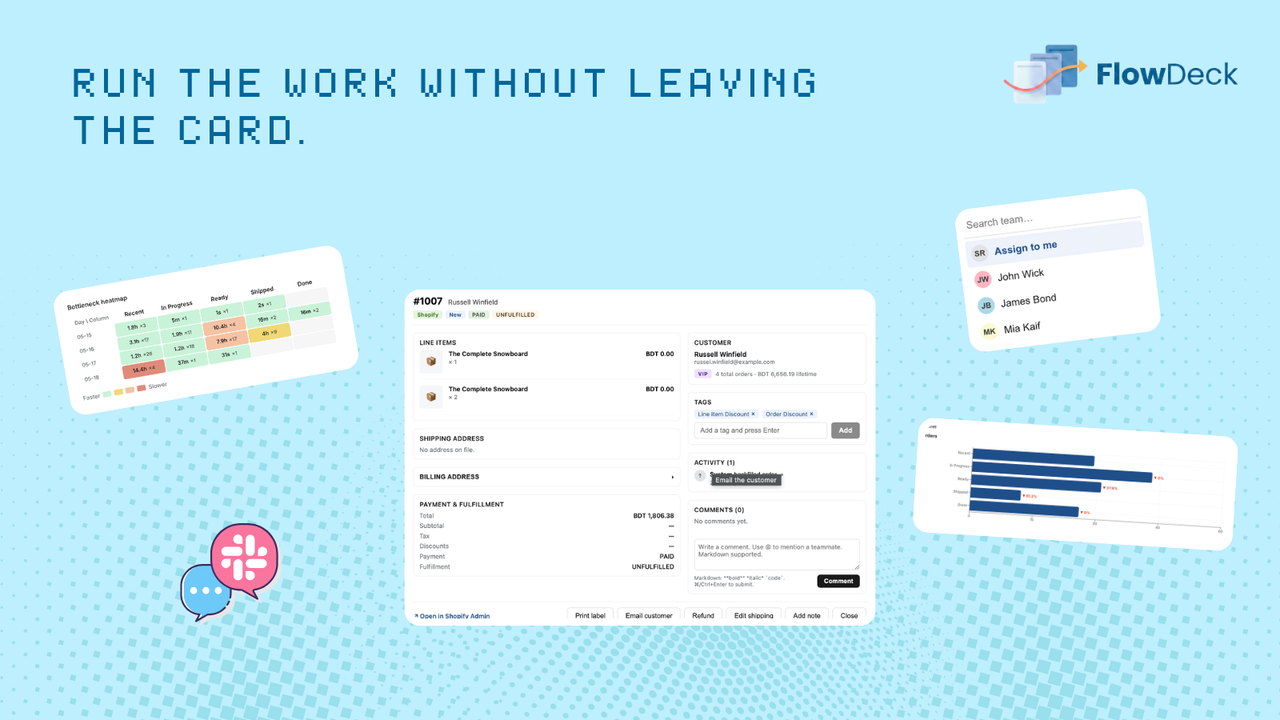
FlowDeck order card from the public App Store listing (card surface; no multi-column Kanban frame on the listing as of Aug 2026). Cards are marketed as reflecting order state in real time.
Pricing comparison (checked 31 July 2026 — confirm live on publish day)
| Tier | FlowDeck | Orderline |
|---|---|---|
| Free | 1 board, 50 orders/mo, 1 seat | — (7-day trial instead) |
| Entry paid | $12.95/mo — 10 boards, 10,000 orders/mo, 5 seats | $9/period — Starter |
| Upper | $29.95–$99.95/mo — up to unlimited boards/orders/seats | $19–$39/period — Pro / Pro+ |
FlowDeck’s free plan is a real advantage for trying board-style ops with zero risk. Its paid tiers scale by boards, orders, and seats; Orderline’s by volume and staff access. Note the trial difference too — three days on FlowDeck’s paid plans, seven on Orderline.
Best for / not for
| FlowDeck | Orderline | |
|---|---|---|
| Best for | Teams that think in cards and columns; shops that want SLA timers and WIP limits; anyone who wants to test the concept free | Makers who need every order’s images and customizations on one scannable table; shops that want pack/fulfill/labels on the same screen |
| Not for | Anyone who needs a review-deep app today (1 App Store review as of research); dense line-item image reading (not claimed) | Kanban purists; flow-analytics buyers |
Can you use both?
They overlap too much to justify both long-term — two staff surfaces for the same orders would recreate the two-system problem these tools exist to kill. If you’re torn, run the honest test: FlowDeck’s free plan and Orderline’s trial in the same week, with your real orders. The right answer usually shows itself by Friday.
When to pick FlowDeck anyway
Pick FlowDeck when the Kanban metaphor is how your team already thinks — when dragging a card to “Curing” is worth more than any table, when SLA countdowns and WIP limits match how you manage, or when the free plan is the right price to find out. It’s a genuinely interesting new entrant. Just go in knowing it’s new: one review today, features evolving, and line-item detail depth worth verifying first.
Common questions
Is FlowDeck proven enough to run my production on?
As of 31 July 2026 it’s two months old with one review. That’s not a disqualifier — every app starts there — but it means you should trial it with real orders before the team depends on it, and re-check the listing for how it’s maturing.
Do FlowDeck cards show my customers’ customization text?
Its listing makes no claim for it (checked 1 Aug 2026) — cards are marketed as reflecting order state in real time, not as a line-image scan. If reading engravings without opening orders is your core need, confirm it on the listing screenshots or in a trial before choosing — it’s Orderline’s most core feature.
Can I drag orders to reorder priority in Orderline?
No — Orderline sorts by ship-by urgency, dates, and filters rather than freeform drag. If drag-anywhere priority is a must-have, that’s a real FlowDeck (or project-board) advantage today.
Does FlowDeck do packing slips or shipping labels?
Its listing doesn’t claim them as of 31 July 2026. Orderline prints bulk packing slips and buys labels via Shippo from the same work list.
What does this cost compared with Orderline?
FlowDeck is free for one board up to 50 orders a month, then $12.95–$99.95 by boards/orders/seats. Orderline runs $9 to $39 per period with a 7-day trial — pricing has the live numbers (checked 31 July 2026).
What to do next
If cards and columns are the shape your shop thinks in, FlowDeck’s free plan is a zero-risk test. If the morning needs a dense, readable list of what to make — try ours.
- Install Orderline (7-day trial)
- Pricing
- Who it’s for
- Related: Orderline vs monday.com · Orderline vs Shopify Orders · Custom production statuses · Ship-by deadlines
Sources (retrieved 31 July 2026)
- FlowDeck Order Workflow, Shopify App Store listing (rating, pricing, features, launch date) — https://apps.shopify.com/flowdeck
- Peer tools research packet —
apps/growth/compare/research/peer-tools-research-2026-07-31.md(§3.4) - Orderline product truth —
context/about-orderline.mdand live guides - Orderline pricing — https://orderlinehq.com/pricing