
Compare · monday.com
Orderline vs monday.com for made-to-order Shopify orders (and Asana/Trello)
Running custom orders on monday.com (or Asana/Trello) vs Orderline as a list next to Shopify. Honest strengths of project boards and the dual-system tax.
Who this is for
Shopify sellers who make or personalize products after payment and already run production on a project board — monday.com, Asana, or Trello — with status columns, due dates, and one card or row per order. You want a straight answer: keep the board, or move the daily queue into a Shopify-native list.
Who this isn’t for: Teams whose main need is multi-warehouse inventory software, full factory materials planning, or customer tracking pages after a parcel is in the mail. A project board isn’t those tools — and neither is Orderline.
We build Orderline, so we’re not neutral here — read the “when a project board is the right call” section as critically as the rest. This page exists because a paying Orderline merchant showed us the Monday and Asana boards they ran custom orders on before switching — the details below come from that real setup, anonymized.
The short answer: A project board is a genuinely good freeform production queue — colorful statuses, due dates, any column you invent, for any kind of work. It’s a weak order queue when every card has to be created and maintained by automation or by hand, when engraving text and product images don’t travel with the card, and when fulfillment still happens back in Shopify. Keep the board if it runs more than orders — marketing, wholesale, projects — or if freeform is simply how your team thinks. Move the order queue to Orderline when the tax becomes the double system: cards that lag the real order, automations that hit plan limits, and staff re-checking Shopify anyway. Orderline is the daily driver that needs no recipe: orders land on the list by themselves with images and customization text on every row, and fulfillment happens on the same screen — one system, no sync to babysit.
You can keep both. Plenty of shops will run orders in Orderline and everything else on the board.
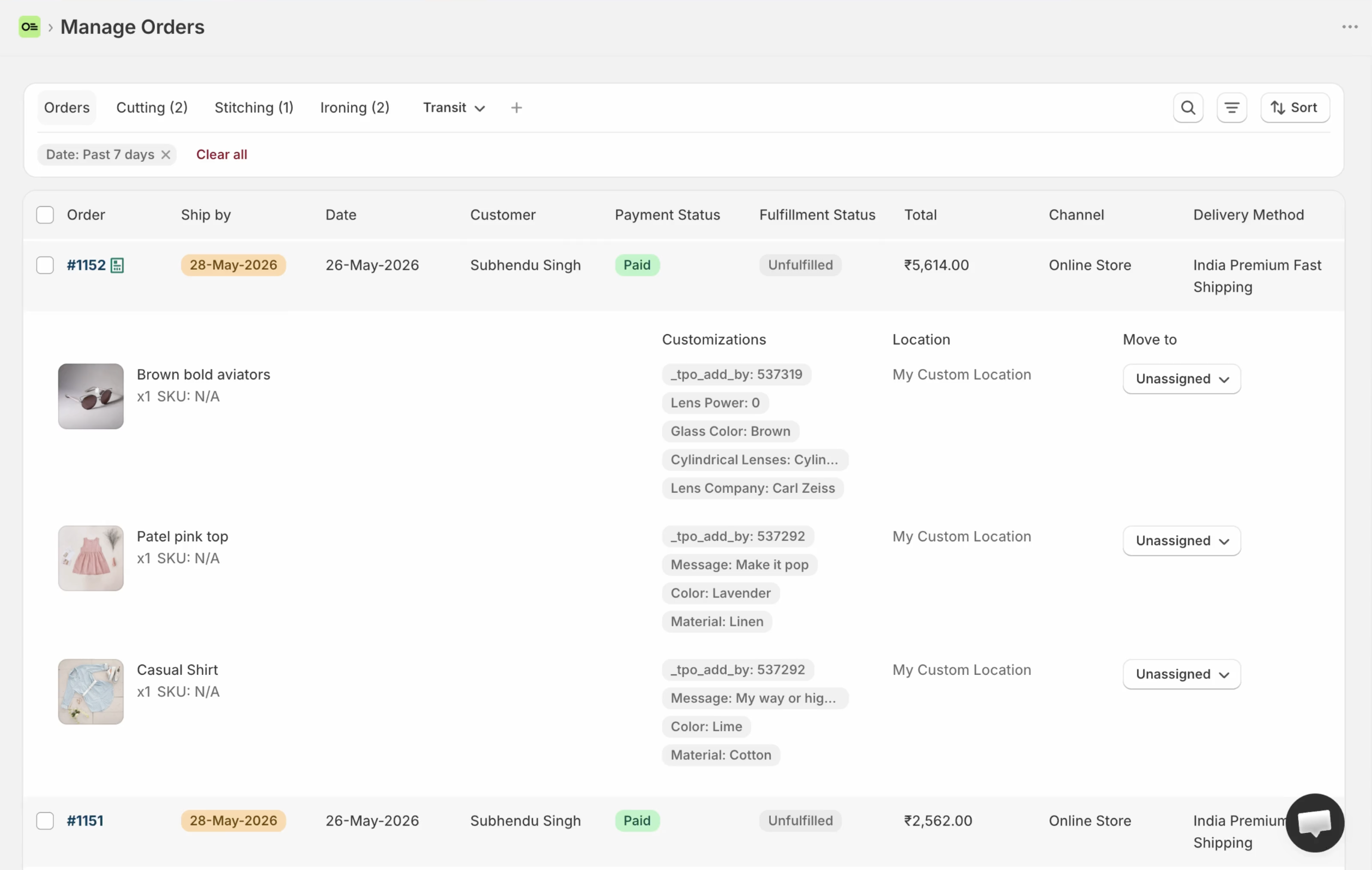
Orderline’s production list: images, line items, customizations, statuses, and ship-by — born from the Shopify order, not synced into a second system.
Key takeaways
- Project boards are real production software for custom shops — a paying merchant showed us color-coded status chips, process dropdowns, due dates, and order-item columns on their Monday and Asana boards (internal product feedback, 31 July 2026).
- The board is always a second system: Shopify holds money and fulfillment, the board holds the queue, and automation or manual entry keeps them matching — until an action limit or a deleted column breaks the recipe.
- monday.com has an official Shopify integration for tracking orders and inventory (monday.com/integrations/shopify, retrieved 31 July 2026). It syncs order events; it doesn’t put line-item images and customization text on a card for you by default.
- Boards win on freeform columns, files, and non-order work. Orderline wins on line-item images and customizations, internal stages, ship-by urgency, and fulfill/pack/labels from the same screen — with no second system to maintain and no weekly hours lost keeping two lists in agreement.
- Cost shape differs: boards charge per seat (monday ~$9–$19/seat/mo, Asana from $10.99/user/mo, Trello from $5/user/mo — all checked 31 July 2026); Orderline is $9 / $19 / $39 per period with a 7-day trial (pricing).
What job are we solving?
This page is only about the production queue for personalized Shopify orders: what to make, in what stage, and when it should leave — after payment is in.
It is not about:
- Managing marketing campaigns, product launches, or wholesale projects (boards are excellent there)
- Customer-facing order tracking after shipping
- Replacing Shopify payment, refunds, or the official order record
If you’re comparing simpler workarounds first, see Orderline vs Shopify Orders, Orderline vs tags and Shopify Flow, or Orderline vs Google Sheets. This page is for shops that already graduated to a real board.
How merchants use monday.com for custom orders today
The board that becomes the shop floor
The setup is impressively consistent across shops. One board — often literally named “Custom Orders.” One item per order. Status columns with colored chips: New, Proof Sent, In Production, Questions, Ready. A due date column. Groups that mirror how the shop thinks: by product family, by week, by channel. Columns for order items and order notes, so nobody has to open Shopify for the basics.
A paying Orderline merchant ran exactly this on both Monday and Asana for their custom-cups business — color-coded statuses, process dropdowns, due dates they could drag to re-prioritize, and the customer’s uploaded artwork attached right to the item (internal product feedback, 31 July 2026). When we asked what they loved, the answer was the visibility: the whole day on one colorful screen.
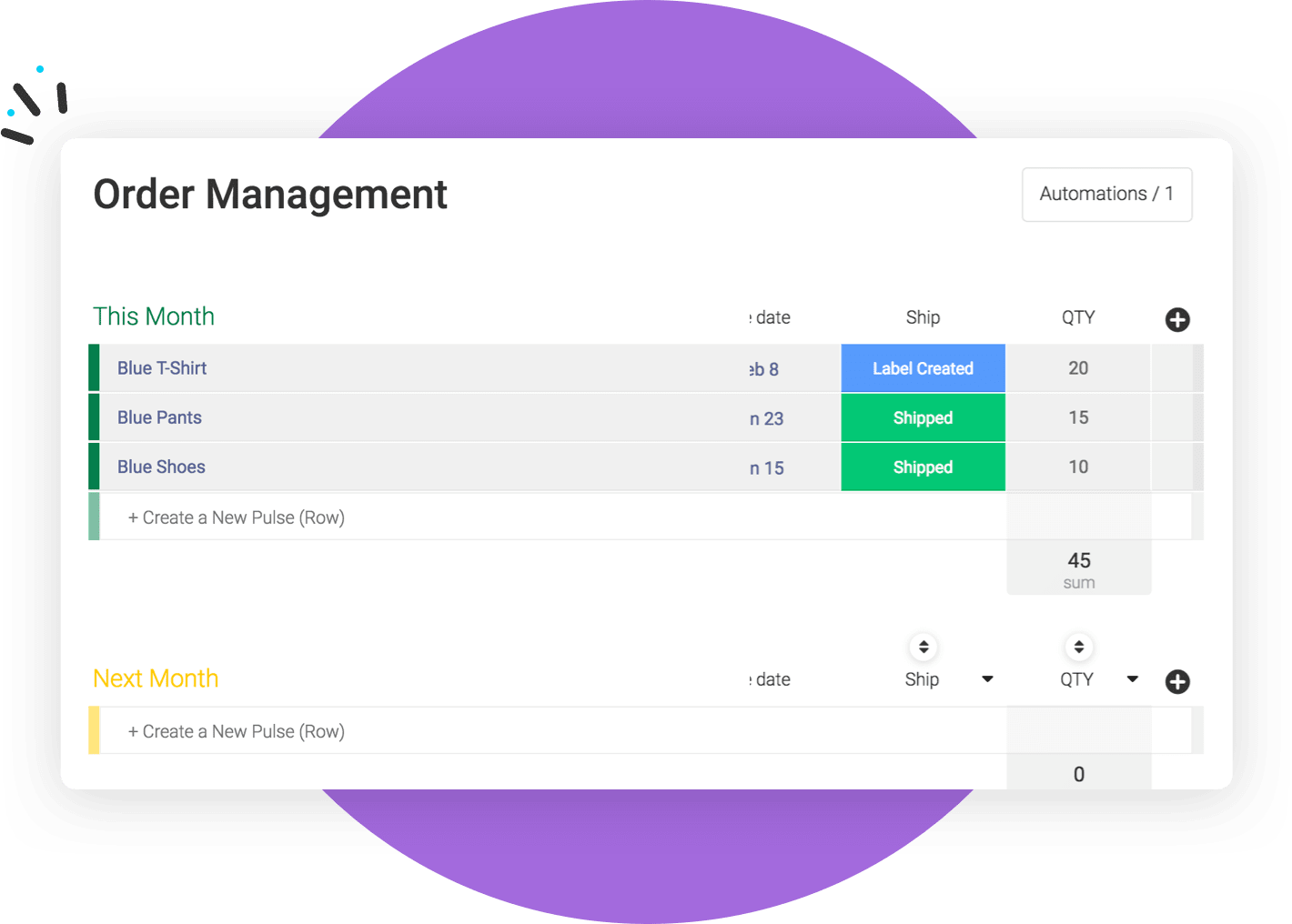
Official monday.com “Order Management” board sample (Shopify integration marketing). Status chips, dates, quantities — public board graphic, not a private merchant’s Custom Orders board.
Getting orders onto the board
Orders arrive on the board through automation or manual entry. monday.com has an official Shopify integration that tracks products, inventory, and orders and notifies you when an order comes in (retrieved 31 July 2026), and merchants commonly wire “new Shopify order → create item” recipes on top of it. The merchant above had exactly that automation running.
The catch is in what lands on the card. An order event syncs, but the integration’s own page doesn’t promise line-item images and customization text as card content — check what your recipe actually maps. The merchant solved it with dedicated columns and discipline — which works, until the recipe hits a plan’s action limit or someone deletes the status column the recipe depends on. Both happened to them.
Why the board feels right for a long time
Because it mostly is right — for a while. It’s visual, it’s flexible, the team already knows it, and it can hold work that isn’t orders at all. If your production queue shares a tool with your marketing calendar, that consolidation is a real benefit. Respect it.
Where a project board breaks for made-to-order production
Two systems, one truth problem
Shopify owns the order: payment, edits, refunds, fulfillment. The board owns the queue. Every change has to cross the bridge — refund issued in Admin, card still says “In Production.” Automation narrows the gap; it never closes it, and it introduces its own failure modes: action limits, broken recipes, and sync delays that nobody notices until a mistake ships.
The order’s details don’t travel
A card can hold whatever you paste into it. That’s the problem. Line-item images, the exact customization text, the variant — the things a maker actually needs — start life in Shopify and have to be carried across by recipe or by hand. When the carry fails, staff open Shopify anyway, and the board becomes a very colorful index of a system they’re actually working in.
Fulfillment happens somewhere else
Moving a card to “Done” doesn’t fulfill the order, print the packing slip, or buy the label. The team finishes the work on the board, then does the work again in Shopify. That second pass is the daily tax — the same double entry we describe on the Google Sheets comparison, with better colors.
Seats multiply, limits bite
Board pricing is per seat: monday.com runs roughly $9–$19 per seat per month on paid tiers, Asana from $10.99, Trello from $5 (all checked 31 July 2026). A bench of five is a line item, not a rounding error. And automation — the thing keeping the two systems glued — is exactly what lower tiers ration.
monday.com vs Orderline, side by side
| What you need | monday.com (Asana/Trello same class) | Orderline |
|---|---|---|
| See line items, images, and customizations without opening Shopify | Manual — columns you fill by recipe or paste | Strong — unified orders view, native to the order |
| Internal production stages in your shop’s words | Strong — freeform status columns and colors | Custom statuses, optional groups, colors (statuses guide) |
| Ship-by / due dates with live urgency | Due-date columns; manual reorder; no order-aware urgency | Ship-by with urgency; automatic rules or dates you set / Flow can write (ship-by guide) |
| Files attached to the job (customer artwork, work files) | Strong — file columns on any item | Not a file vault — customer uploads stay on the Shopify order |
| Drag-anywhere priority on the list | Strong — freeform drag | Not drag-rank — sort by ship-by, date, and filters |
| One system with Shopify (no re-keying) | No — second system + automation | Yes — embedded app; the list is the order |
| Automate board creation from new orders | Strong — official Shopify integration + recipes | Orders sync natively; Flow can write ship-by |
| Non-order work (marketing, projects) on the same tool | Strong — that’s the product | No — Orderline is orders and drafts only |
| Customer “where is my order?” after shipping | DIY | Not Orderline’s main job |
| Bills of materials and factory planning | No | No — use manufacturing software if that is the real need |
| Fulfill, pack, buy labels from the work list | No — back in Shopify | Fulfill from Orderline with sync, packing slips, optional Shippo labels |
| Quotes as draft orders before payment | Manual items | Drafts board with its own statuses |
| Money cost | Free tier; paid ~$9–$19 per seat/mo (Asana from $10.99/user, Trello from $5/user) | Starter $9, Pro $19, Pro+ $39 per period; 7-day trial (pricing, 31 July 2026) |
| Time to start | Build the board, wire recipes, maintain them | Install; the list works day one; deepen statuses when ready |
Two cells deserve plain honesty: Orderline does not have drag-anywhere reordering, and it does not have a staff file vault. If those two are your must-haves, the board wins them today.
How they work together
You don’t have to shut the board down.
- Run paid custom production in Orderline — images, customizations, stages, ship-by urgency, fulfill from the same screen.
- Keep the board for everything that isn’t the order queue — marketing, wholesale projects, product launches.
- Keep Shopify Admin for payment, refunds, risk, and the official order.
- Retire the order-sync recipes — the ones that hit action limits at month-end. You won’t need them for production anymore.
A calm first week: install Orderline and confirm images and options show without opening each order; rebuild your board’s status chips as named statuses with colors; turn on ship-by so priority sorts itself; then watch how often anyone still opens the order board. That number tells you the rest.
When a project board is the right call
Stay on the board when the tool genuinely runs more than orders — when losing the marketing calendar and the launch plan to save the order queue is a bad trade. Stay when freeform is non-negotiable: arbitrary file columns, drag-anywhere priority, your exact shade of orange on every status. And stay when order volume is small enough that the double entry is a few minutes a day, not a salary.
Choose a different kind of software entirely when you need materials and manufacturing orders as the system of record, or automatic customer progress pages. Neither product here is that.
When Orderline is the wrong buy (fair)
Orderline is a poor fit if:
- Your board runs your whole business, not just orders, and consolidation matters most
- Drag-anywhere priority and file columns are must-haves, today
- You won’t pay for an ops app when a free board tier covers the queue
- You need materials, costing, or factory planning, not an order list
Boards win on freeform everything and non-order work. Orderline wins on one system with Shopify — the queue that can’t drift from the order because it is the order.
Common questions
Does Orderline replace monday.com?
For the order queue, yes — that’s the point. For marketing calendars and general projects, no, and it isn’t trying to. Most shops that switch keep the board for non-order work.
Can I sync monday.com with Orderline?
There’s nothing to sync: Orderline reads the Shopify order directly. If you keep a board for other work, it simply stops needing order data.
What about Asana or Trello instead of monday.com?
Same class, same comparison. Asana starts free for two users, Trello from $5 per user per month, monday.com from around $9 per seat per month (all checked 31 July 2026). The dual-system trade-offs are identical; the differences are taste and price.
The board’s colors and files are why my team loves it. Honest answer?
Then weigh those rows heavily. Orderline has colored statuses, but not freeform color chrome, and it doesn’t store work files. We’d rather lose the sale than have you churn in month two over a file column.
What does this cost compared with the board?
Boards charge per seat — a five-person bench on monday.com Standard lands around $60/month at list prices. Orderline runs $9 to $39 per billing period by volume and staff access, with a 7-day trial — pricing has the live numbers. The bigger cost difference is usually the hours of double entry, not the subscription.
What to do next
If the board is beautiful but the team still lives half the day in Shopify — or the sync recipes keep breaking at the worst time — try the queue that’s born from the order.
- Install Orderline (7-day trial)
- Pricing
- Who it’s for
- Related: Orderline vs Google Sheets · Orderline vs Shopify Orders · Unified orders view · Ship-by deadlines
Sources (retrieved 31 July 2026)
- monday.com pricing — https://monday.com/pricing
- monday.com official Shopify integration — https://monday.com/integrations/shopify
- Asana pricing — https://asana.com/pricing
- Trello pricing — https://trello.com/pricing
- Merchant VOC (paying Orderline customer, Monday + Asana custom order boards) — anonymized internal product feedback, 31 July 2026; see
compare/vs-pages-framework.md§1.1 - Peer tools research packet —
apps/growth/compare/research/peer-tools-research-2026-07-31.md(§3.9–3.11) - Orderline product truth —
context/about-orderline.mdand live guides - Orderline pricing — https://orderlinehq.com/pricing