
Compare · Google Sheets
Orderline vs Google Sheets for made-to-order Shopify orders
When a spreadsheet export is enough for custom Shopify production—and when a live list next to Admin wins. Honest side-by-side for personalized shops.
Who this is for
Shopify sellers who make or personalize products after payment and already push orders into a spreadsheet (Google Sheets, or a similar grid like Airtable) so the team can see line items, notes, and due dates. You might use export apps, Zapier, Make, or plain copy-paste. You want a straight answer: keep the sheet, or run the day on a production list that stays next to Shopify.
Who this isn’t for: Teams whose main need is multi-warehouse inventory software, full factory materials and bills of materials, or customer tracking pages after a parcel is already in the mail. A sheet isn’t those tools — and neither is Orderline.
We build Orderline, so we’re not neutral here — read the “when a spreadsheet is enough” section as critically as anything else on this page.
The short answer: A Google Sheet is a strong bootstrap. You can invent any column you want, sort by a due date you typed yourself, and share a tab with someone who never opens Shopify. It’s a weak live work list once the sheet becomes a copy of the real order: every refund, line edit, or new personalization has to be retyped or re-synced, and fulfillment still happens in Shopify while status lives in a cell. Stay on a sheet if volume is low, one person owns the tab, and you accept that the sheet is a copy. Add Orderline when the morning becomes “update the sheet, then update Shopify again,” or when due dates and stages won’t stay sorted for a multi-person team.
Keeping a sheet for finance, materials, or one-off analysis still makes sense. It’s the live make-list for paid custom orders that moves next to Admin.
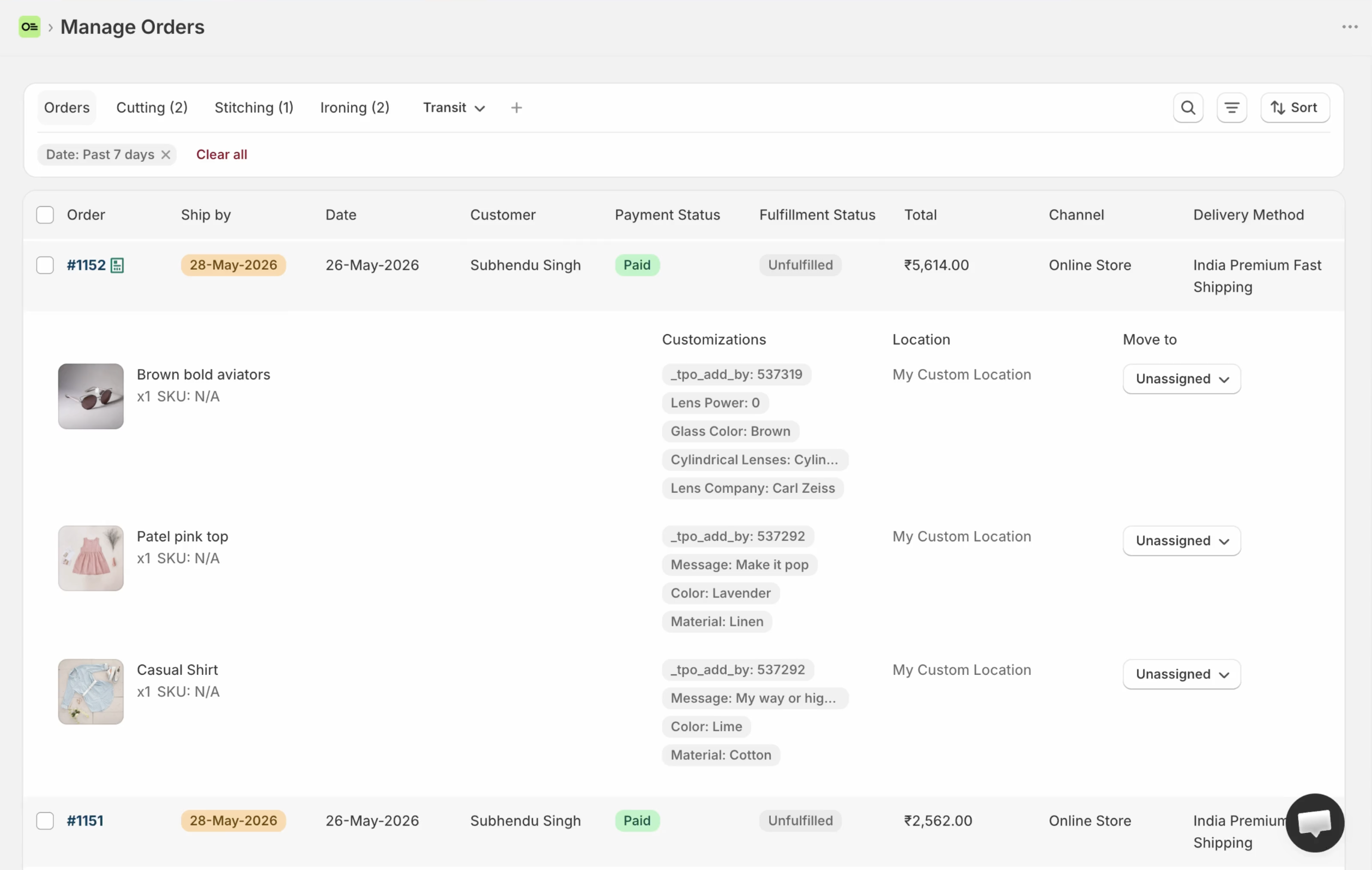
Orderline’s production list: images, line items, customizations, statuses, and ship-by on the same order Shopify already knows — without a second paste into a grid.
Key takeaways
- Sheets win on freeform columns and speed of setup. They lose when the order in Shopify and the row in the sheet disagree.
- Shopify sellers often reach for Sheets or Airtable when the native Orders list hides line details — including in public threads about custom order management (r/shopify discussion, retrieved 31 July 2026).
- A paying merchant who automated orders into a sheet told us it was fine until sort and priority stopped matching how they run the day (internal product feedback, 31 July 2026). That’s a common ceiling, not a rare edge case.
- Orderline isn’t a spreadsheet. It won’t replace every formula or materials tab. It’s a production list embedded in Shopify for what to make, by when, and in which stage.
- Google Sheets itself is free (Google account limits apply). Orderline is $9 / $19 / $39 per billing period with a 7-day trial (pricing, checked 31 July 2026).
What job are we solving?
This page is only about the production queue for personalized Shopify orders: what to make, in what stage, and when it should leave — after payment is in.
It is not about:
- Using Sheets for bookkeeping, ads, or inventory counts that aren’t the make list
- Collecting options on the product page (options apps still own that)
- Replacing Shopify payment, refunds, or the official order record
If you never left Admin, start with Orderline vs Shopify Orders. If you already use tags and Flow as free labels, see Orderline vs tags and Shopify Flow. This page assumes the free fix was export the work to a grid.
How people use Google Sheets for custom orders today
Export, then work the tab
The pattern is sensible, and it shows up everywhere. Shopify Admin doesn’t put every engraving and image on the Orders list, so you push the orders out: a CSV export, an export app, or an automation like Zapier, Make, or n8n. The columns almost invent themselves — order number, customer, product, personalization text, due date, stage, notes, assignee. The team filters and sorts in the sheet, and someone marks the order fulfilled back in Shopify later.
It’s popular because it’s fast to invent and everyone already knows a grid. No new login, no new app fee, no training session.
Airtable and “smart sheets”
Some shops run the same play in Airtable or a similar tool, for nicer views and forms. The job is the same: a second grid that holds production state while Shopify holds money and fulfillment. Everything below applies to that whole class, not just to Google’s brand name.
Why the sheet feels enough for a long time
You control the columns. You can color rows. You can share a link without buying a Shopify staff seat. For a solo maker with ten open custom orders, a careful tab can genuinely feel clearer than Admin. That’s a real win, and this page won’t pretend otherwise.
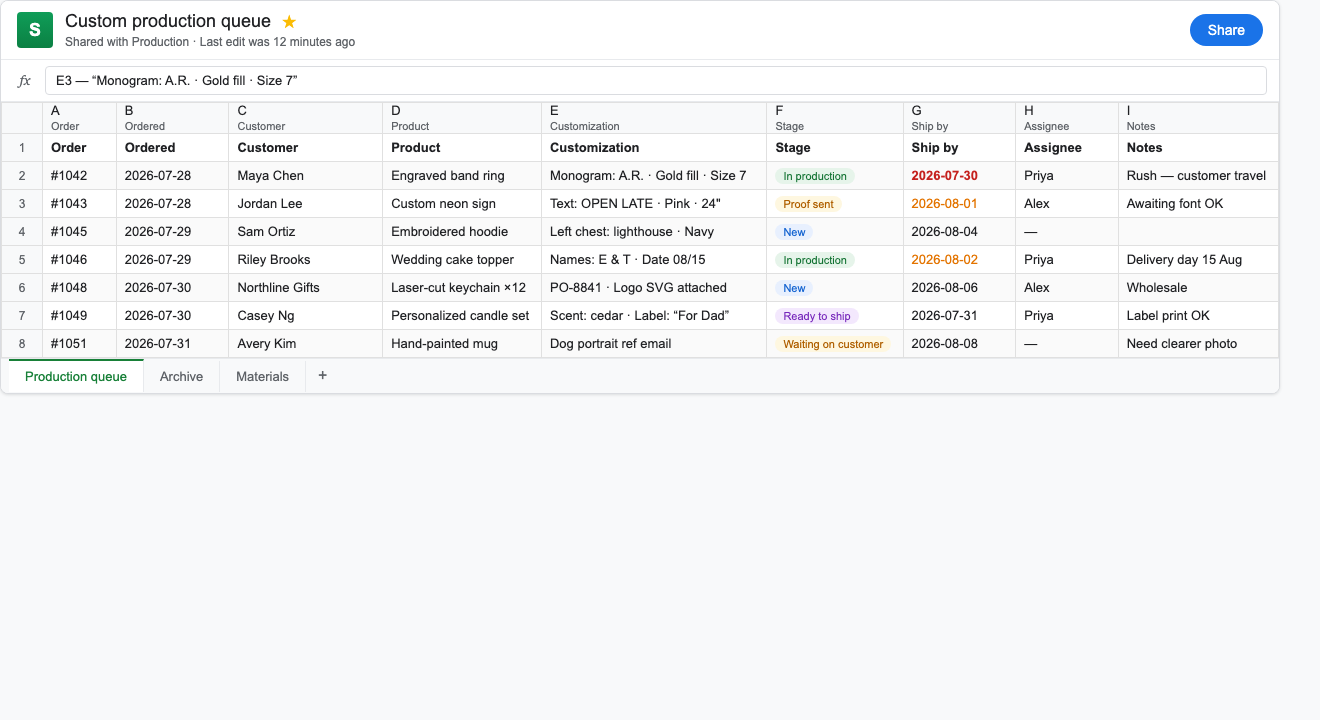
Sample production tab (illustrative data): order number, product, personalization, stage, ship-by, and assignee — the free bootstrap many custom shops build by hand.
Where a spreadsheet breaks for made-to-order work
Two places of truth
The moment an order is paid, Shopify holds the official record. The sheet holds a copy. Refunds, line edits, cancellations, and new notes in Admin don’t fix the sheet by themselves. Automation helps — until the mapping breaks, a column gets renamed, or someone edits the wrong row. Then the team spends the morning arguing about which surface is right.
Sort and priority are fragile
Sheets sort fine by a due-date column. They get awkward when several people edit at once, when “must leave today” urgency should follow shop rules, or when one order carries mixed priorities. The merchant feedback we got in July 2026 said it plainly: automation into a sheet was fine until sort stopped matching how they needed to run the day. That’s not a knock on Google Sheets as software — it’s the limit of using a general grid as a live shop-floor list.
Personalization still needs a careful paste
Export quality depends on your stack. Some pipelines land line properties neatly in cells. Others dump a blob, miss image thumbnails, or lag behind checkout. When the paste is wrong, staff re-open Shopify anyway — which was the exact problem the sheet was meant to solve.
Fulfill, pack, and labels live elsewhere
You can mark “done” in a cell. Shipping labels, packing slips, and the official fulfilled status still live in Shopify (or another app). The sheet doesn’t remove that second step — it usually adds a third: update the row after you fulfill.
Growth multiplies glue
More staff means more simultaneous editors. More channels means more export rules. More exceptions mean more columns, until the tab becomes a museum of every problem you ever had. That’s usually when shops jump to Monday or Asana (a different comparison), or start looking for a list that’s born from the Shopify order instead of copied into a grid.
Google Sheets vs Orderline, side by side
| What you need | Google Sheets (export class) | Orderline |
|---|---|---|
| See line items, images, and custom options without opening every order | Possible if your export is careful; easy to get incomplete | Strong — unified orders view on the live order |
| Internal production stages in your shop’s words | Columns and colors you invent | Custom statuses, optional groups, colors (statuses guide) |
| Ship-by or “must leave by” on the work list | Date column you maintain; sort can fight multi-user edits | Ship-by with urgency; automatic rules or dates you set / Flow can write (ship-by guide) |
| Gift delivery day, retailer, or purchase order as a day board | Freeform columns; you own the filter rules | Custom columns and saved views (columns, views) |
| Keep one place of truth with Shopify | Weak — sheet is usually a copy | Strong — embedded app; no retyping the order for the list |
| Automate row creation | Strong — Zapier, Make, native export tools | Orders sync into Orderline; Flow can still write ship-by |
| Customer “where is my order?” after shipping | Not the sheet’s job | Not Orderline’s main job |
| Bills of materials, material costs, factory planning | Sheets can model this well | No — use manufacturing or costing tools if that is the real need |
| Fulfill, pack, buy labels from the same work list | Mark cells; fulfill still in Shopify | Fulfill from Orderline with sync, packing slips, optional Shippo labels |
| Quotes as draft orders before payment | Separate sheet or tab if you invent it | Drafts board with its own statuses |
| Money cost | Sheets free within Google account limits; automation tools may cost | Starter $9, Pro $19, Pro+ $39 per period; 7-day trial (pricing, 31 July 2026) |
| Time to start | Fast if you already know Sheets | Install; list value day one; deepen statuses when ready |
Orderline does not replace every spreadsheet in the business. Finance tabs, material calculators, and one-off analysis can stay in Sheets forever.
How they work together
You don’t have to burn the sheet.
- Keep Sheets for work that isn’t the live make list: costing, supplier quotes, marketing calendars, or a weekly export for an accountant.
- Run paid custom production in Orderline: scan lines and options, move internal stages, sort by ship-by, save views for delivery day or retailer.
- Keep Shopify Admin for payment, refunds, risk, and the official order.
- Optional: a nightly export from Shopify for archive or analysis — not the place staff race the morning queue.
That’s different from typing every new order into a tab by hand. The list should be born from the order, not recreated beside it.
If you already live in a sheet, a calm first week looks like this:
- Install Orderline and confirm images and options appear without opening each order.
- Map your stage column values to a short list of statuses with colors.
- Turn on ship-by if deadlines matter — automatic from shipping rules, or dates you set.
- Recreate one important sheet column as a custom column (delivery date, purchase order, retailer).
- Freeze the production tab as “archive only” so the team stops updating two places.
When Google Sheets is enough
Stay on a sheet when open custom volume is small, one person owns the tab, your export or paste is reliable, and you’re fine updating Shopify separately once the physical work is done. Stay on it too when the grid is really for costing or materials, not the daily make list.
Prefer something else entirely when you need full manufacturing orders and materials as the system of record, or when the pain is only customer-facing progress messages. Those are different categories — not “more columns.”
When Orderline is the wrong buy (fair)
Orderline is a poor fit if:
- You only needed a temporary table for a weekend pop-up and you’ll delete it Monday
- Your real work is materials and cost models that belong in a spreadsheet forever
- You refuse any paid ops app and will accept copy-paste forever
- You need freeform project boards for non-order work more than a Shopify-connected list
Sheets win on infinite freeform columns and zero new app fee. Orderline wins on one place of truth with Shopify for the production morning.
Common questions
Do I have to stop using Google Sheets if I install Orderline?
No. Keep sheets for finance, materials, and analysis. Move the live make list for paid custom orders into Orderline so staff aren’t updating two production surfaces.
Can a sheet replace Orderline?
For a small solo queue, sometimes for a while. It doesn’t replace a list that stays tied to the live Shopify order, with fulfill and packing from the same place.
Is Airtable the same comparison?
For this decision, yes in class: a second grid outside Shopify Admin. Brand polish differs; the double-entry and fulfill-elsewhere problems rhyme.
Will Orderline import my existing sheet?
You map stages and columns in Orderline from how you already work. There’s no requirement to paste historical rows; open orders sync from Shopify.
What does this cost compared with free Sheets?
Google Sheets is free within normal Google account limits, and automation tools may charge their own fees. Orderline runs $9 to $39 per billing period depending on volume and staff access, with a 7-day trial — pricing has the live numbers.
What to do next
If the sheet already shows the work but the team still retypes Shopify changes — or sort and priority keep fighting you — try a list that syncs from the order instead of beside it.
- Install Orderline (7-day trial)
- Pricing
- Who it’s for
- Related: Orderline vs Shopify Orders · Orderline vs tags and Shopify Flow · Unified orders view
Sources (retrieved 31 July 2026)
- Shopify Help, Orders — https://help.shopify.com/en/manual/orders
- Shopify sellers on Reddit (r/shopify), custom order management and list visibility — https://www.reddit.com/r/shopify/comments/1rilj4m/seeking_advice_on_a_custom_order_management/
- Shopify Community, manufacturing steps beyond unfulfilled/fulfilled — https://community.shopify.com/t/how-to-add-additional-fulfillment-status-for-manufacturing-process-steps/253013
- Orderline product truth —
context/about-orderline.mdand live guides - Orderline pricing — https://orderlinehq.com/pricing
- Internal merchant feedback on sheets sort limits —
compare/vs-pages-framework.md(VOC, 31 July 2026) - Related compares —
/compare/shopify-orders,/compare/tags-and-flow