
 Try for free
 Blog
Top 6 Shopify Product Options Apps (2026)
Compare Globo, Easify, Infinite Options, OPTIS, PC, and Qikify — free plans, App Store reviews, and where customer choices land on orders. Plus Podifai, a newer pick for engraved and embroidered goods.
Written by Subhendu Singh · Published · Updated
On this page
- Which product options app should you use? (Short answer)
- What is a Shopify product options app?
- What are common use cases for product options apps?
- Personalized text on the product page
- File uploads for made-to-order products
- Delivery dates and scheduling
- Paid add-ons and upsells
- More than 3 options or complex combinations
- When can you use Shopify variants instead of an app?
- How did we evaluate these apps?
- Which product options app is best? A quick comparison
- Globo Product Options — safest free start
- Easify Custom Product Options — best live preview
- Infinite Options — most proven
- OPTIS Product Options — break the variant wall cheaply
- PC - Custom Product Options — cheapest honest paid tier
- Qikify Custom Product Options — AI-assisted builder
- Podifai Product Customizer — best live preview for engraved, embroidered and monogrammed goods (newcomer)
- Apps we left out, and why
- 4 things to check before you install
- Which product options app should you pick?
- How to see customer selected options, metafield data and line items in one view?
- Frequently asked questions
- Are product options the same as variants?
- Can I charge extra for an option?
- Where do the customer's choices show up?
- Will a product options app slow down or break my theme?
- Will a product options app add a column to the orders list?
- Which product options app has the best reviews?
- Sources
If you already know what product options apps are and how they differ from variants, skip to What are common use cases for product options apps? or jump straight to the comparison table.
In this guide, we compare the 6 best product options apps for Shopify in 2026 — what each one costs, what merchant reviews actually say about them, and where the customer’s choices land on the order. We also cover Podifai, a newer app worth knowing about if you sell engraved, embroidered or monogrammed products.
Written by Subhendu Singh, founder of Orderline · Reviewed by Anjali Rathore · Updated 14 October 2026
Key Takeaways
- Product options apps let customers type text, pick dates, upload files, and add paid add-ons on the product page — things Shopify variants cannot do.
- Globo and Easify are the strongest free starting points. Infinite Options is the oldest and most proven, but it is paid only.
- Before choosing, check where the choices land on the order — readable line item properties and order attributes are easy to work with; one big order note is not.
- If you want to see the customer selected customizations at a glance without opening each order in Shopify, read how orderline does this in its own order management screen
- Newer does not automatically mean worse: Podifai has the deepest live preview for engraved, embroidered and monogrammed goods, but its review base is far smaller than the six apps below — we say so plainly where it appears.
Which product options app should you use? (Short answer)
If you are in a hurry:
- Best free start: Globo or Easify — both have genuinely usable free plans.
- Best live preview: Easify — customers see their text on the product image as they type.
- Most proven: Infinite Options — around since 2015, paid only ($12.99/month).
- Cheapest honest paid tier: PC Custom Product Options — free for basic fields, paid from $8.90/month.
- Best for engraved, embroidered or monogrammed goods: Podifai — layered live preview (image masks, curved text, monograms) included on the free plan. A newcomer: its small review base is disclosed in full below.
Ratings and prices below are as of September 2026 (Podifai: October 2026) — please re-check the app listing before you buy.
What is a Shopify product options app?
A product options app adds input fields to your product page: text boxes, date pickers, file upload buttons, dropdowns, checkboxes, and swatches. Simply put, it collects choices from customers that Shopify’s built-in variant system cannot handle.
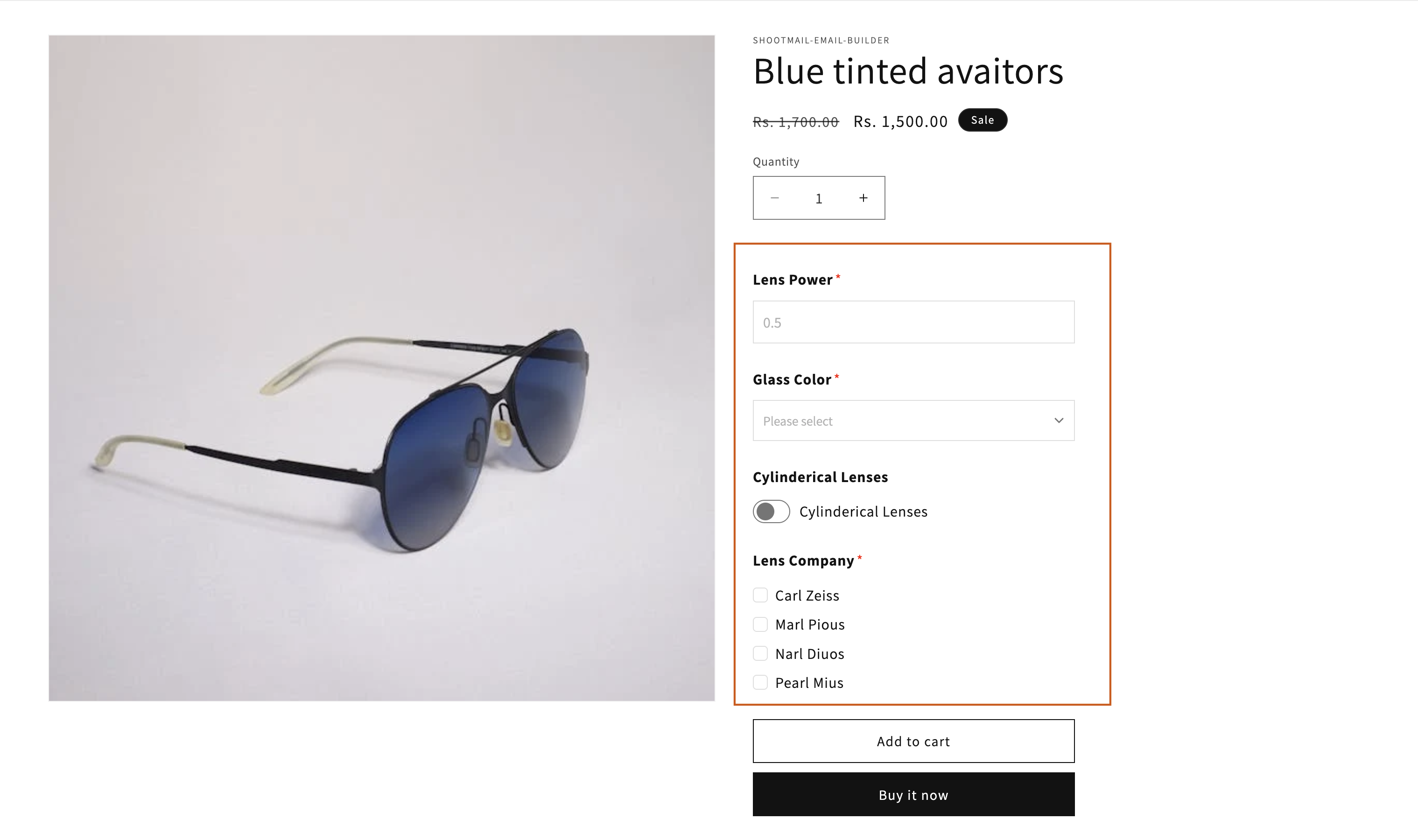
Shopify variants only support simple dropdown choices like size and color — and only 3 options per product (with up to 2,048 variants). None of those options can be free text, a date, or a file upload.
When the customer places the order, their choices are saved on the order in one of these places:
- Line item properties — shown under each product on the order page (the name on this necklace).
- Order custom attributes — shown in the Additional details box (one delivery date for the whole order).
- A paid extra line item — if the option adds a charge, like gift wrap for $5.
This matters more than it seems. These are the structured storage spaces that Shopify provides and this makes it easy to read the information.
Product options apps are not the same as metafield apps. Generally speaking, product options app add customer facing customization choices on the product pages and metafields are used to store additional product or orders data for additional information on product pages or for internal staff use like order production stages, QC status etc.
Some stores need both — see Top Metafield Editing Apps for Shopify (2026).
What are common use cases for product options apps?
Here are the jobs merchants most often solve with product options apps — and why Shopify variants alone fall short.
Personalized text on the product page
A jewellery store lets customers type a name or initials for engraving. A gift shop collects a custom message for a card. A stationery seller asks for monogram letters.
Variants cannot store free text — only predefined choices like “Size M” or “Color Red.”
File uploads for made-to-order products
A photo-print shop lets customers upload an image for a cushion or canvas. A print-on-demand store collects artwork files at checkout.
File uploads require a product options app (or a dedicated upload app). Variants have no file field.
Delivery dates and scheduling
A florist or baker lets customers pick a delivery date on the product page. A catering business collects an event date.
Date pickers are a product options feature. If you need that date visible on your orders queue later, check whether the app saves it as an order custom attribute — not just a line item note.
Paid add-ons and upsells
Gift wrap for $5, rush production for $15, or an extra charm on a bracelet. Product options apps can add a charge that appears as an extra line item on the order.
More than 3 options or complex combinations
A furniture store needs size, fabric, leg style, and cushion fill — four dimensions that exceed Shopify’s 3-option limit. Apps like OPTIS help you break past the variant wall without creating thousands of SKUs.
When can you use Shopify variants instead of an app?
| Stay with Shopify variants when… | Use a product options app when… |
|---|---|
| Choices are simple dropdowns (size, color, material) | Customers need to type free text |
| You have 3 options or fewer | You need more than 3 option dimensions |
| No file uploads or date pickers | Customers upload photos or pick dates |
| Standard inventory per variant | Add-ons are charges, not separate SKUs |
If the left column sounds like you, stop here — you do not need a product options app.
How did we evaluate these apps?
We compared apps on things that matter in daily work, not just feature lists:
- Field types (text, date, file upload, swatches) and conditional logic (“show this field only if…“)
- Paid add-ons (charge $5 extra for gift wrap)
- Where the choices show up: order page, packing slip, order confirmation email
- What the free plan actually includes
- Review quality — we read critical reviews too, not just the stars
- How long the app has been around, and how responsive support is
We left out brand-new apps with only a handful of reviews — with one reasoned exception, noted in full below. Ratings and review counts below come from each app’s Shopify App Store listing, retrieved 8 September 2026. We also read filtered low-star reviews on the App Store to identify recurring complaints.
Which product options app is best? A quick comparison
| App | Rating | Price | Free plan | File & date fields | Live preview |
|---|---|---|---|---|---|
| Globo Product Options | 4.9★ (~5,000 reviews) | Free; paid from ~$9.90/mo | Yes — unlimited option sets | Yes | On paid plans |
| Easify Custom Product Options | 4.9★ (~3,000 reviews) | Free; paid from ~$9.99/mo | Yes | Yes | Yes — the best here |
| Infinite Options | 4.7★ (~2,500 reviews) | $12.99/mo, 14-day trial | No | Yes | Limited |
| OPTIS Product Options | 4.9★ (~2,300 reviews) | Free; paid from ~$9.99/mo | Yes | Yes | Check listing |
| PC - Custom Product Options | 4.7★ (~1,180 reviews) | Free basic; $8.90 or $18.90/mo | Basic fields only | On paid plans | — |
| Qikify Custom Product Options | 4.9★ (932 reviews) | Free plan | Yes | Check listing | AI-assisted builder |
Globo Product Options — safest free start
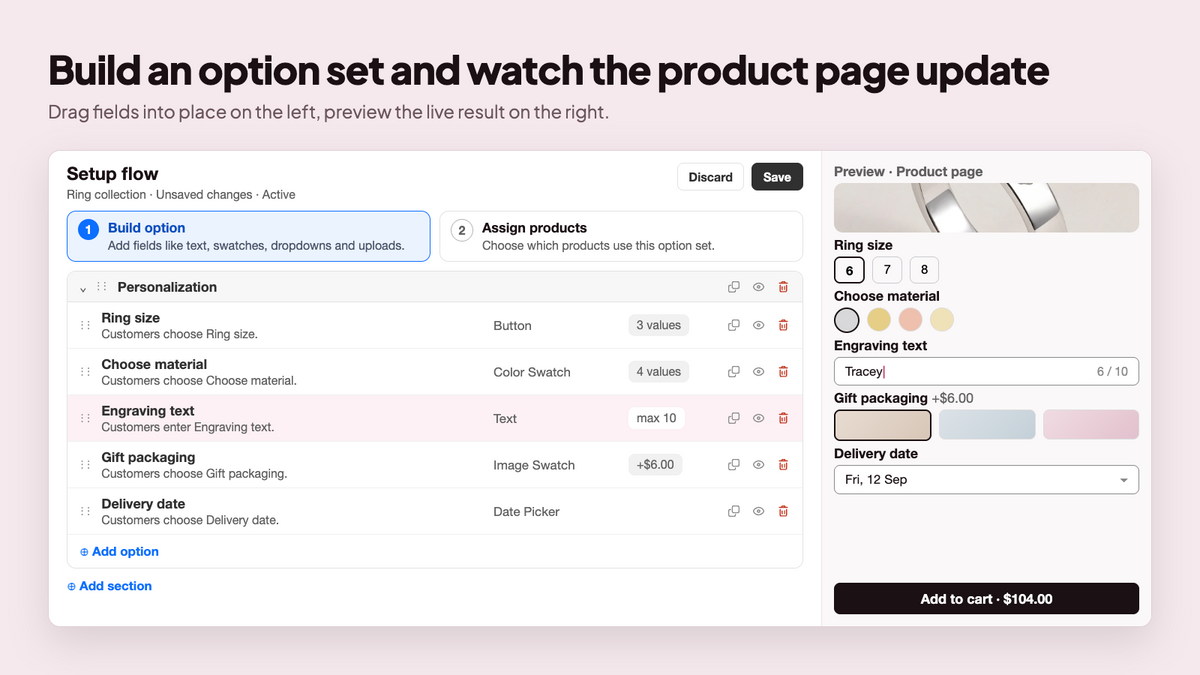
Globo (launched December 2020, ~5,000 reviews) is the most reviewed app in this category. You get 15+ field types, conditional logic, bulk option sets (apply the same options to many products at once), and CSV import. The free plan is genuinely usable: unlimited option sets, products, and orders, with choices shown on the order page, packing slips, and order emails — and no watermark.
What merchants praise (from App Store reviews):
- Fast, hands-on support. Multiple reviews name specific support agents who fixed conditional logic and variant-pricing issues quickly — not just FAQ links.
- Strong free plan. Merchants call it “best bang for your buck” for options and upsells, with a simple free-or-paid tier structure.
- Handles complex intake. Event businesses praise Globo for collecting many client details in one transaction instead of email back-and-forth.
What merchants criticize:
Breaks on complex setups. 1-star reviews report the app corrupting store settings, conditional formatting failing on some products, and slow or unhelpful support for US time zones.
Live preview on paid only. If customers need to see personalization on the product image, that sits on paid plans.
Plus-store pricing. Some reviews mention higher pricing for Shopify Plus — confirm on the listing before committing.
Best when: you want a free start with room to grow.
Skip if: live preview on the product image is a must-have, or you need the most battle-tested vendor with zero drama.
Where choices land: line item properties; paid add-ons appear as extra line items.
Easify Custom Product Options — best live preview
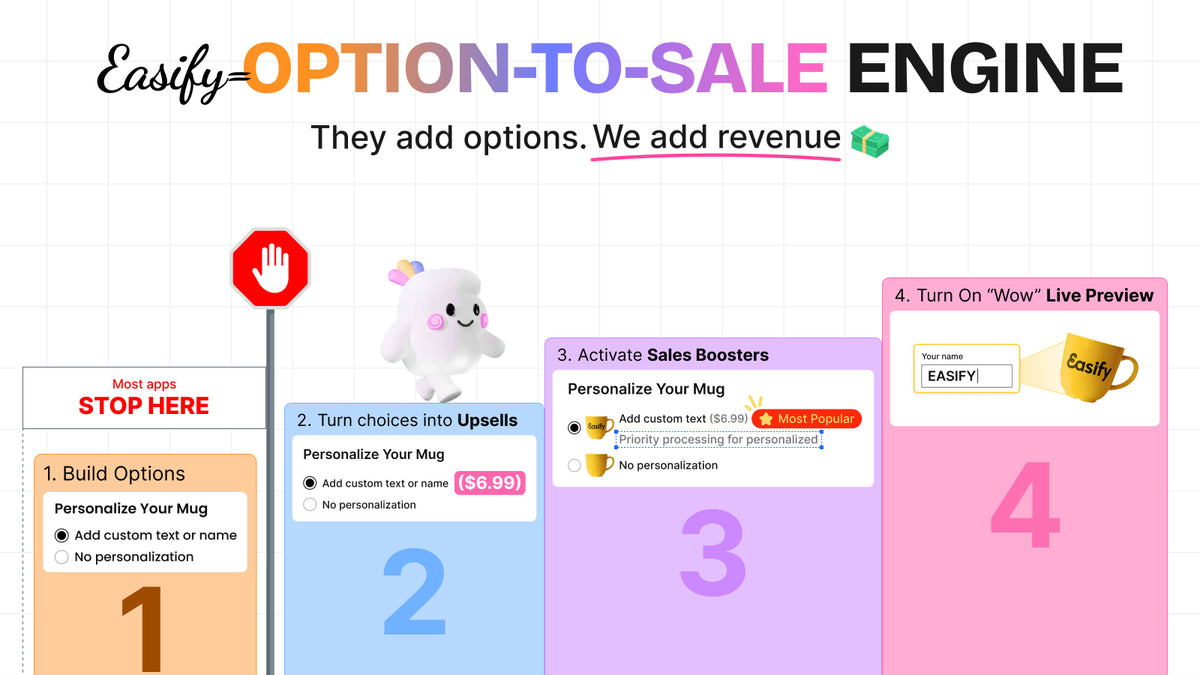
Easify (launched April 2023, ~3,000 reviews) is the youngest of the top group and the fastest riser. Its standout feature is the live preview: customers see their engraving or monogram on the product image as they type. That alone can lift conversion for personalized products.
What merchants praise:
- Live preview. The clearest differentiator in this category — visual personalization on the product page as the customer types.
- Responsive support. Long-term users (2+ years) report quick help for option sets, custom messages, and multi-variant products.
- Feature-rich option sets. Reviews highlight fine-grained controls for messages, variants, and add-ons on the free plan.
What merchants criticize:
Pricing conflicts with native variants. Critical reviews describe incorrect pricing when combining Shopify variants with Easify options — requiring repeated support patches.
Sold-out product gap. A 4-star review notes the app hides options for out-of-stock variants but not for fully sold products — a basic requirement for some catalogs.
Support fixes causing new issues. Some merchants report that after support made changes, new problems appeared elsewhere in their setup.
Best when: visual personalization is your product — engraving, monograms, photo prints.
Skip if: you want the oldest, most battle-tested vendor, or your catalog mixes native variants with complex per-option pricing.
Where choices land: line item properties; paid add-ons as extra line items. Free plan includes choices on packing slips and emails.
Infinite Options — most proven
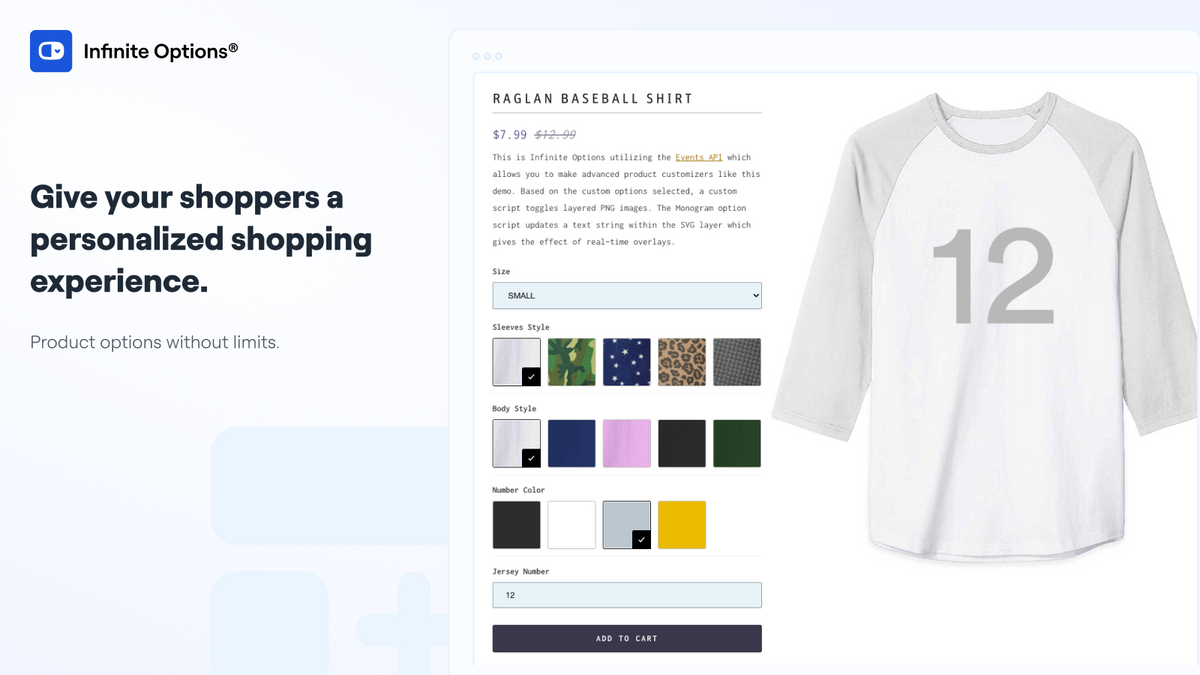
Infinite Options (launched June 2015, ~2,500 reviews) is built by ShopPad — the oldest app on this list. Text, swatches, date, file uploads, checkboxes, conditional logic, bundles, and add-on products are all covered, and the support team has a long, strong reputation.
What merchants praise:
- Stability and longevity. Around since 2015 — merchants value a vendor that has survived every Shopify platform change.
- Fast setup help. Reviews mention support implementing full option setups in under 5 minutes for non-technical store owners.
- Upsell results. Merchants report customers choosing paid add-on options immediately after setup.
What merchants criticize:
No free plan. $12.99/month after a 14-day trial — a non-starter if you need to test before paying.
Support delays on hard problems. 1-star reviews describe unresolved issues after a week of back-and-forth, with merchants eventually coding their own fix.
Limited live preview. Not the pick if visual personalization on the product image is central to your product.
Best when: you value stability and support over a free plan.
Skip if: you need a free plan, or you want strong live preview.
Where choices land: line item properties, plus add-on products for paid extras.
OPTIS Product Options — break the variant wall cheaply
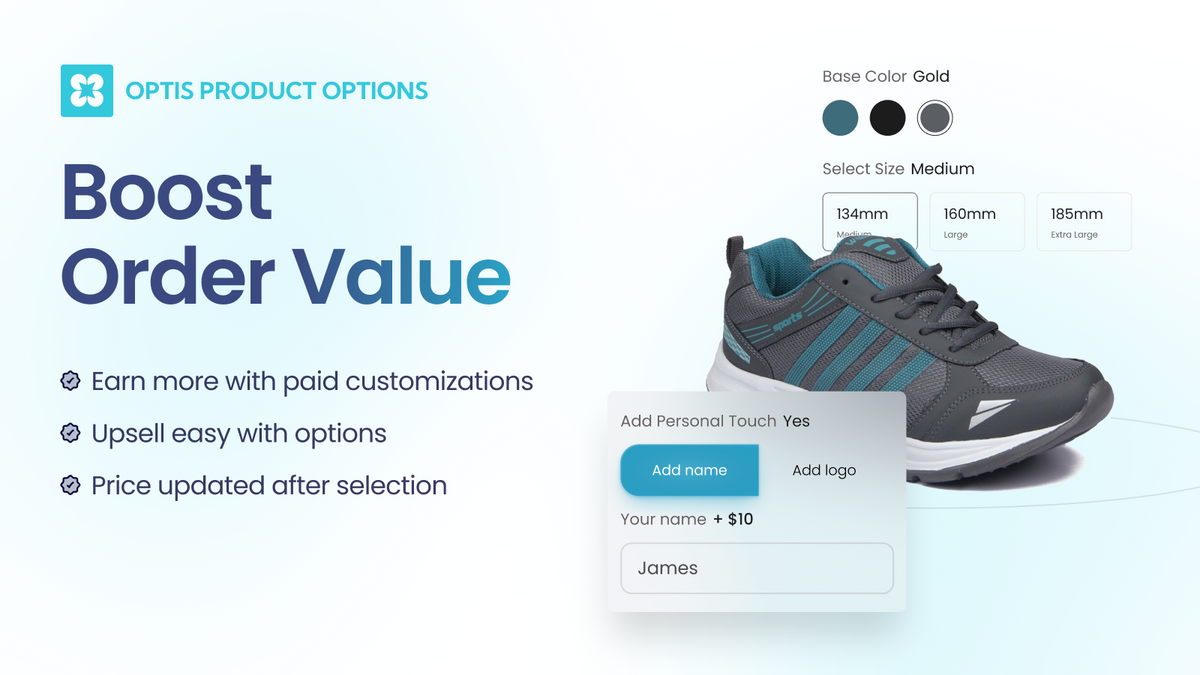
OPTIS (launched December 2021, ~2,300 reviews) is a well-rated option with a free plan and paid plans around $9.99/month. Besides the usual text fields and add-ons, it helps you go beyond Shopify’s 3-option and variant limits. Made-to-order stores praise its real-time editor preview.
What merchants praise:
- Attentive support. Multiple reviews name support staff who fixed packing-slip display issues and configured accounts hands-on.
- Saves back-and-forth on estimates. Merchants running custom products report hours saved on customization intake.
- Real-time editor preview. Adaptive sports and made-to-order stores highlight seeing exactly how add-ons render before publishing.
What merchants criticize:
Basic UX gaps behind paywalls. 1-star reviews complain that letting customers deselect an option requires a paid upgrade — something other apps include free.
Theme compatibility. Some merchants needed developers to fix display issues the app did not handle out of the box.
Locked core features. Critical reviews flag charging for functionality competitors include in base plans.
Best when: your products need more than 3 options and you do not want to pay much.
Skip if: you need every basic interaction (like deselecting a choice) without upgrading — check the listing first.
Where choices land: line item properties / add-ons.
PC - Custom Product Options — cheapest honest paid tier
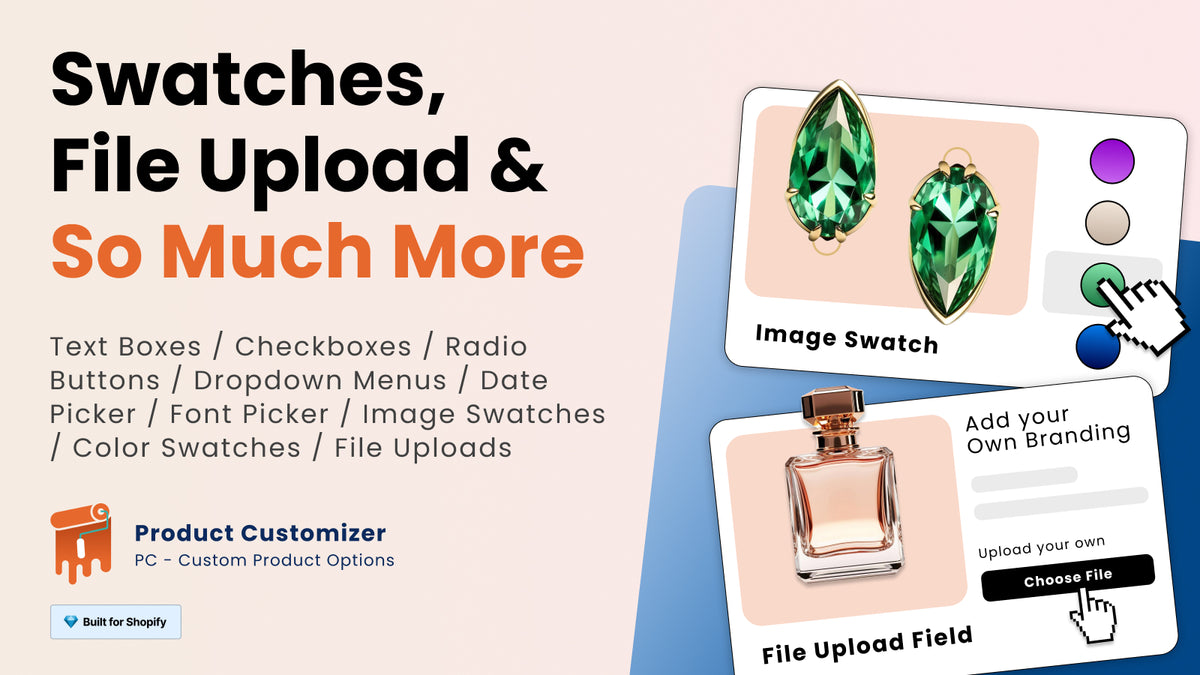
PC (launched November 2012, ~1,180 reviews) has one of the longest track records in this category. The free plan covers basic fields (text, radio, dropdown, checkbox). Paid tiers at $8.90 and $18.90 per month add 10+ field types, templates, conditional logic, and upcharges.
What merchants praise:
- Excellent chat support. Reviews consistently name support agents (Lassandra, Lesandra) who fixed font, color, and field issues quickly.
- Avoid extra variants. Merchants love adding personalization without creating a new variant for every combination.
- Simple for basic needs. Strong fit when your options are text fields and dropdowns, not complex conditional trees.
What merchants criticize:
File upload failures. A detailed 1-star review describes the app stopping customers from adding products with file uploads to cart — causing direct revenue loss.
Theme redirect dependency. Premium tier users report the app only works correctly when the theme sends customers to the cart page — not when “continue shopping” is enabled.
File and date fields on paid only. The free plan is basic by design — confirm paid tiers before assuming uploads or dates are included.
Best when: your needs are simple and you want the lowest paid price.
Skip if: you need file uploads or date fields on the free plan.
Where choices land: line item properties.
Qikify Custom Product Options — AI-assisted builder
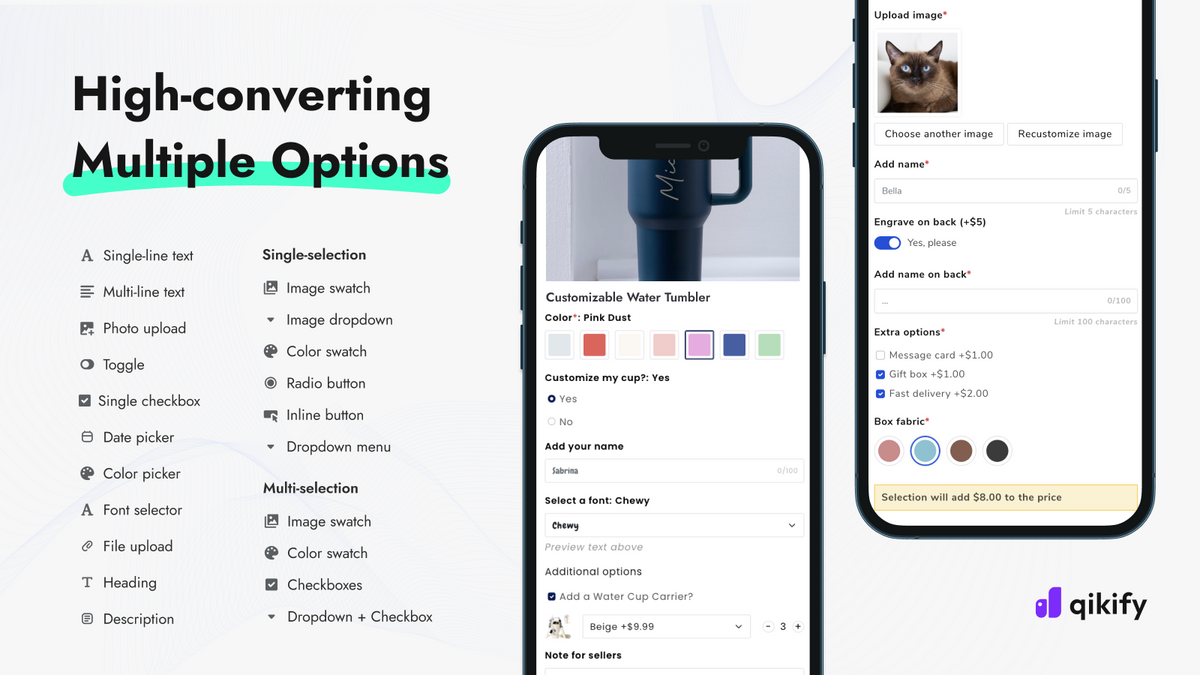
Qikify (launched November 2022, 932 reviews) is the newest app on this list, with an AI-assisted builder that helps you create option forms quickly. Free plan available.
What merchants praise:
- Clean, intuitive interface. Reviews highlight an easy setup for complex product choices without confusing customers.
- Add-on pricing and conditional logic. Merchants value upgrade pricing, option sets across multiple products, and logic that keeps pages organized.
- File upload and text input. Personalized product stores report improved customer experience with upload and text fields working reliably.
What merchants criticize:
Chat-only support. 1-star reviews from paying merchants describe long back-and-forth in chat when a screen-share call would resolve issues faster.
Smaller review base. At 932 reviews, there is less long-term track record than Globo (~5,000) or Easify (~3,000).
Younger app. Less proven through major Shopify platform updates than Infinite Options or PC.
Best when: you want help building forms fast and like trying newer tools.
Skip if: you want a long track record or phone/screen-share support when things break.
Where choices land: line item properties.
Podifai Product Customizer — best live preview for engraved, embroidered and monogrammed goods (newcomer)
Podifai is not one of the six above, and it is not a like-for-like peer. It launched in September 2025 and has 26 reviews, well short of the proven review base every other app here has earned. We include it for one reason — it does something none of the six do as well — and we are stating its numbers plainly so you can weigh that yourself.
| Podifai at a glance | |
|---|---|
| Best for | Engraved, embroidered and monogrammed goods |
| Live preview | Layered 2D — image masks, shapes, multiple product views, curved text, monograms |
| Free plan | Yes — 3 custom products, live preview included |
| Paid from | $7.90/mo (30 products); $15.90/mo unlimited |
| Rating | 4.9★ from 26 reviews (September 2025 launch) |
| Caveat | Review base far smaller than the six above — no platform history yet |
Podifai covers the usual option fields (text, image upload, swatches, dropdowns, conditional logic, dynamic pricing) and adds a layered 2D live preview with image masks, shapes, multiple product views, curved text and monograms. For engraved, embroidered and monogrammed products, that is the difference between the customer guessing and the customer seeing. Live preview is included on the free plan, which covers up to 3 custom products.
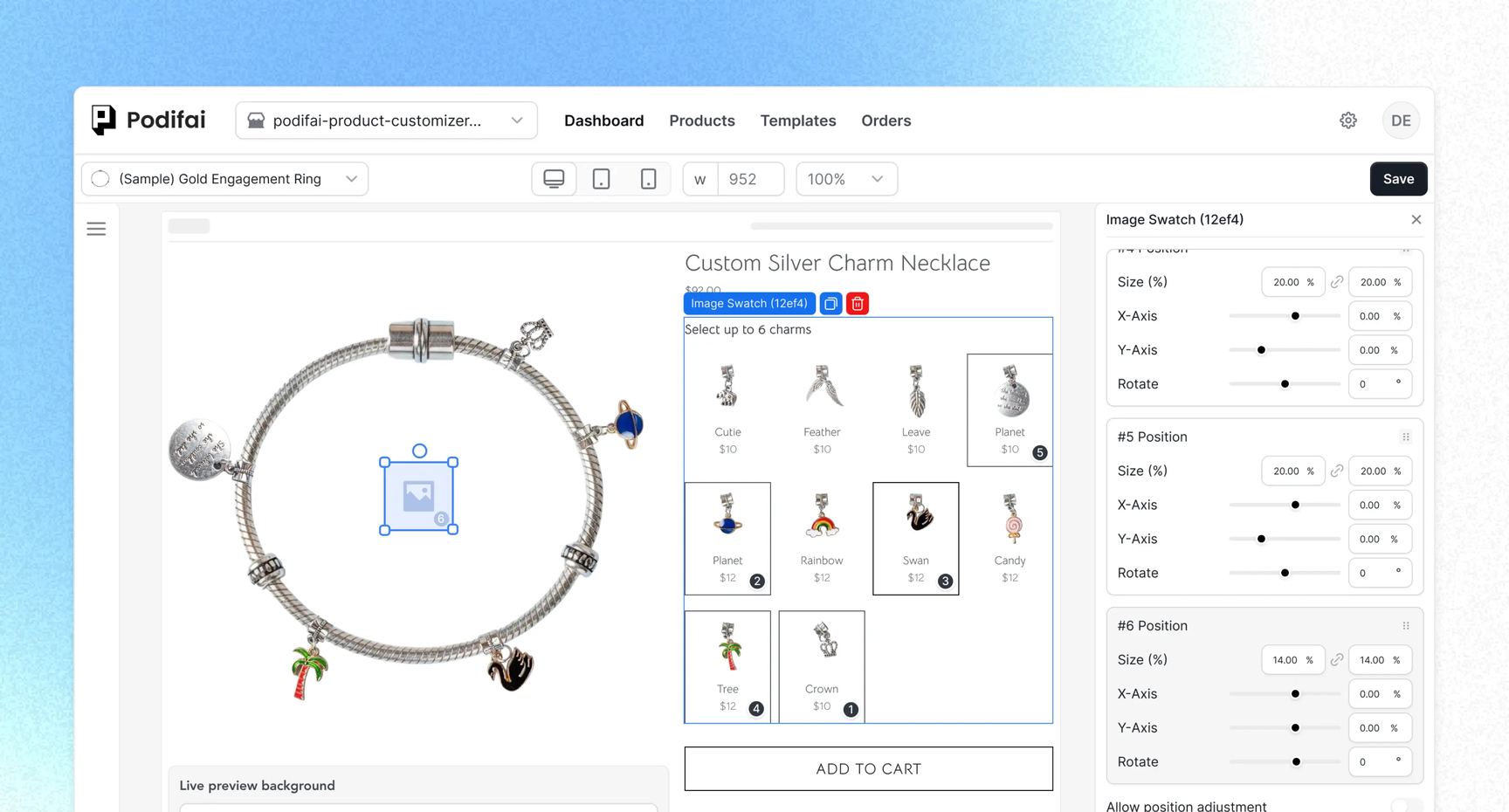
If you produce embroidered goods in-house or through a partner, Podifai’s own production handoff guide covers what gets saved with the order and what your supplier still needs.
What merchants praise:
- Depth on decorated goods. Every substantive review so far comes from an embroidery, patch or stitching business — merchants who need names, thread colours and yarn choices previewed accurately, not plain text on an image.
- Founder-led support. Reviews name the founder and her team directly; one merchant reported a mobile layout bug that a real developer confirmed and fixed rather than sending a canned reply.
- Free plan covers the core. Text, image upload, swatches, conditional logic and real-time preview are all on the free tier.
What merchants criticize:
Almost no track record. 26 reviews at 4.9★ is a good start, not proof. That is roughly a 35th of Qikify’s review base, and the app has not yet weathered the Shopify platform changes the older apps here have.
Too little volume to surface patterns. One 3-star rating and no 1- or 2-star reviews means the recurring complaints every established app here carries are simply unknown for Podifai.
Free plan ceiling. Three custom products is enough to test on, not enough to run a catalogue — Starter ($7.90/month, 30 products) or Growth ($15.90/month, unlimited).
Best when: you sell engraved, embroidered or monogrammed goods and want layered live preview without paying for it.
Skip if: you want a vendor with years of Shopify platform history behind it.
Where choices land: line item properties.
Apps we left out, and why
- Kickflip, Zakeke, Customily, Teeinblue, Inkybay — these are visual, 3D, or print-on-demand customizers built around a mockup designer. A different, heavier job. Podifai stays in the list above because it is an option-form app first, with layered 2D preview rather than a 3D mockup studio.
- Color Swatch King — swatches only, not option forms.
- File Uploads by UploadKit — uploads only.
- Magical Custom Fields — worth knowing about: it also does order-level and checkout fields (Plus). But its workaround for finding orders later is usually tags, not columns.
- Brand-new apps with single-digit reviews — they may be good, but we only recommend apps with a proven review base. Podifai (26 reviews) is the single exception covered above, and its section says so.
4 things to check before you install
- Does a date field save as an order-level attribute (one date for the whole order) or only per product line? Order-level is easier to work with later.
- Do the choices show on packing slips and order emails, not just the order page?
- Are uploads saved as real links you can click, not plain text?
- What exactly does the free plan include — and which feature jumps to paid?
Which product options app should you pick?
| Your situation | Best pick |
|---|---|
| Just starting out, want a free plan | Globo or Easify |
| Customers personalize visually (engraving, monograms, photos) | Easify |
| Engraved or embroidered goods, want live preview on a free plan | Podifai (newer app) |
| You want the most proven app and do not mind paying | Infinite Options |
| Simple text/dropdown needs on a tight budget | PC - Custom Product Options |
| Need more than Shopify’s 3 options / variant limits | OPTIS |
| Want AI help building option forms | Qikify |
How to see customer selected options, metafield data and line items in one view?
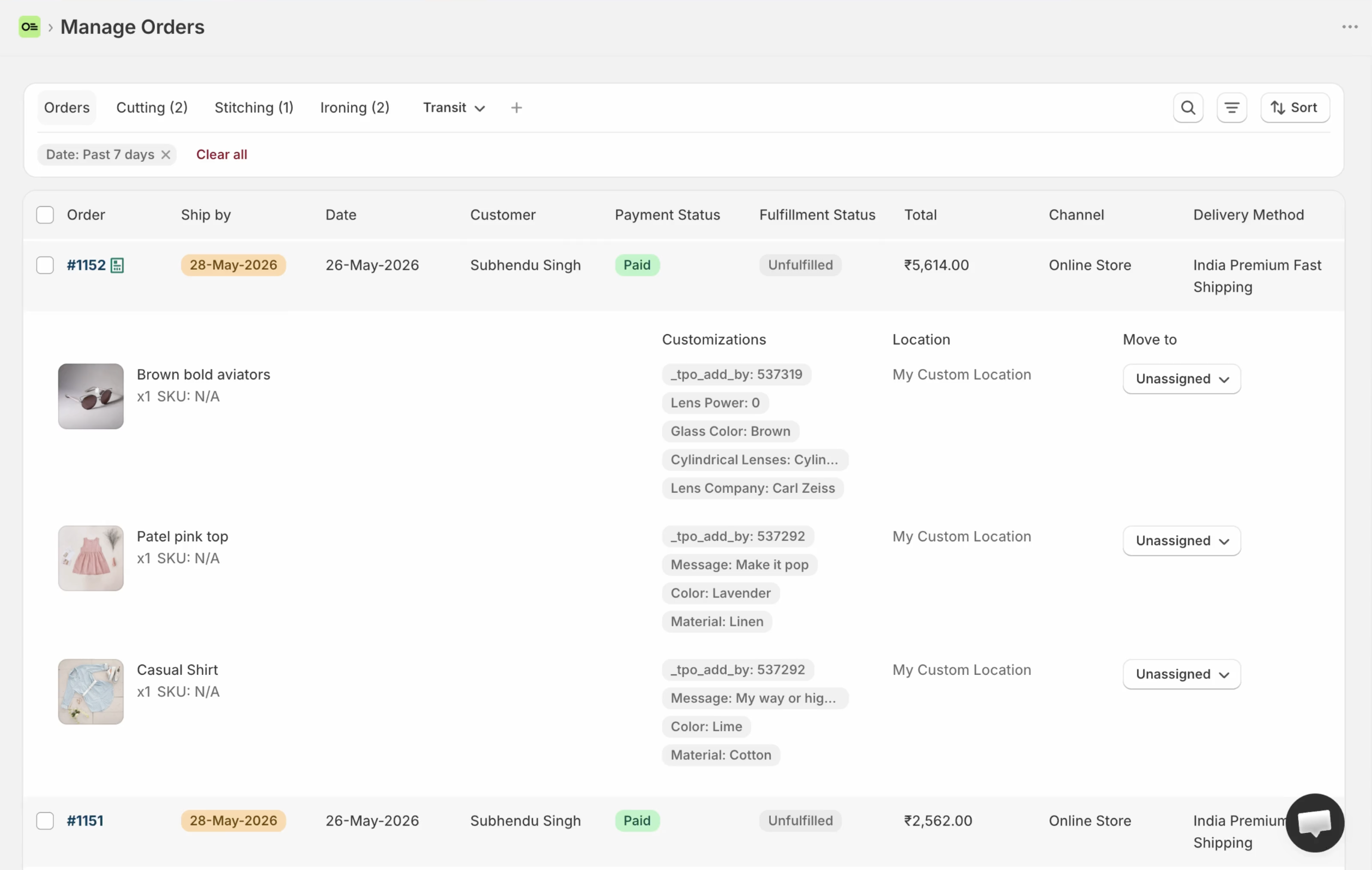
For some merchants, customer choices hold critical data required for order fulfilment. For example, a florist, baker, or personalized gifts maker might need delivery date, engraving text, or uploaded photo links visible right in the orders queue, so fulfilment staff can plan and work accordingly.
Product options apps collect those choices on the product page and save them as line item properties or order attributes — but they do not add columns to Shopify’s official orders table.
Orderline shows all the line items in each order with thumbnails and customer selected options in one view. You can also add your metafields as custom columns like delivery date and time to make it easy for your staff to plan and process orders.
Frequently asked questions
Are product options the same as variants?
No. Variants are Shopify’s built-in system — each combination (like Small / Red) is a separate variant with its own SKU and inventory. Product options are extra inputs on top: free text, dates, file uploads, and add-ons that do not create new variants.
Can I charge extra for an option?
Yes. Every app here supports paid add-ons — for example, $5 extra for gift wrap. The charge usually appears as an extra line item on the order.
Where do the customer’s choices show up?
Under each product line on the order page (line item properties), or in the Additional details box for whole-order values. Most apps can also print them on packing slips and order emails.
Will a product options app slow down or break my theme?
These apps add code to your product page. Most work fine with modern themes, but theme conflicts are the most common complaint in critical reviews. Always test on your own theme during the free plan or trial before committing.
Will a product options app add a column to the orders list?
No. They collect choices on the product page. The orders list in Shopify admin stays exactly the same. For columns, see our custom columns guide.
Which product options app has the best reviews?
As of September 2026: Globo holds 4.9★ across ~5,000 reviews; Easify has 4.9★ across ~3,000 reviews; Qikify has 4.9★ across 932 reviews. Podifai also holds 4.9★, but on only 26 reviews — which is exactly why it sits outside the main six. Star ratings alone do not tell the full story — read the critical reviews for your use case before committing.
About the author
Subhendu Singh is the founder of Orderline. He builds order management software for Shopify merchants who sell made-to-order and personalized products. X: spsbuilds.
Reviewer
Anjali Rathore reviews technical and operational accuracy on Orderline content. LinkedIn.
Sources
- Shopify App Store listings and filtered review pages, retrieved 8 September 2026 — Globo Product Options, Easify Custom Product Options, Infinite Options, OPTIS Product Options, PC - Custom Product Options, Qikify Custom Product Options, Magical Custom Fields
- Podifai Product Customizer, retrieved 8 October 2026 — App Store listing and review page
- Shopify Help Center — Variants
- Related guides — How to Add Custom Columns to Shopify Admin Orders · Top Metafield Editing Apps for Shopify (2026)