Compare · Order Printer Pro
Orderline vs Order Printer Pro for made-to-order Shopify orders
Order Printer Pro is for packing slips and invoices; Orderline is the live production list. Print is not the same as a work queue for custom orders.
Who this is for
Shopify sellers who make or personalize products after payment and lean on printed or PDF documents — packing slips, invoices, pick sheets — so the team can see line items and custom details. You may already use Order Printer Pro or a similar document app. You want a straight answer: keep running the shop on paper, or move the daily work to a live production list.
Who this isn’t for: Teams whose main need is multi-warehouse inventory software, full factory materials planning, or customer tracking pages after a parcel is in the mail. A printer app isn’t those tools — and neither is Orderline.
We build Orderline, so we’re not neutral here — read the “when printed documents are enough” section as critically as the rest.
The short answer: Order Printer Pro is excellent at documents — branded PDF invoices, quotes, receipts, and packing slips, printed or emailed in bulk. It’s not a live work list: the moment a slip prints, it’s a snapshot. It can’t show what stage the work is in, what must leave today, or update itself when the order changes. Keep a printer app for paper and customer-facing PDFs. Add Orderline when the team needs the morning queue itself — every open order with images, customizations, stages, and ship-by on one screen that stays in sync with Shopify. Paper tells you what to make once; the live list is what keeps a late order from sneaking up on you.
The two can happily share a shop. Documents come out of the printer app; the day runs on Orderline.
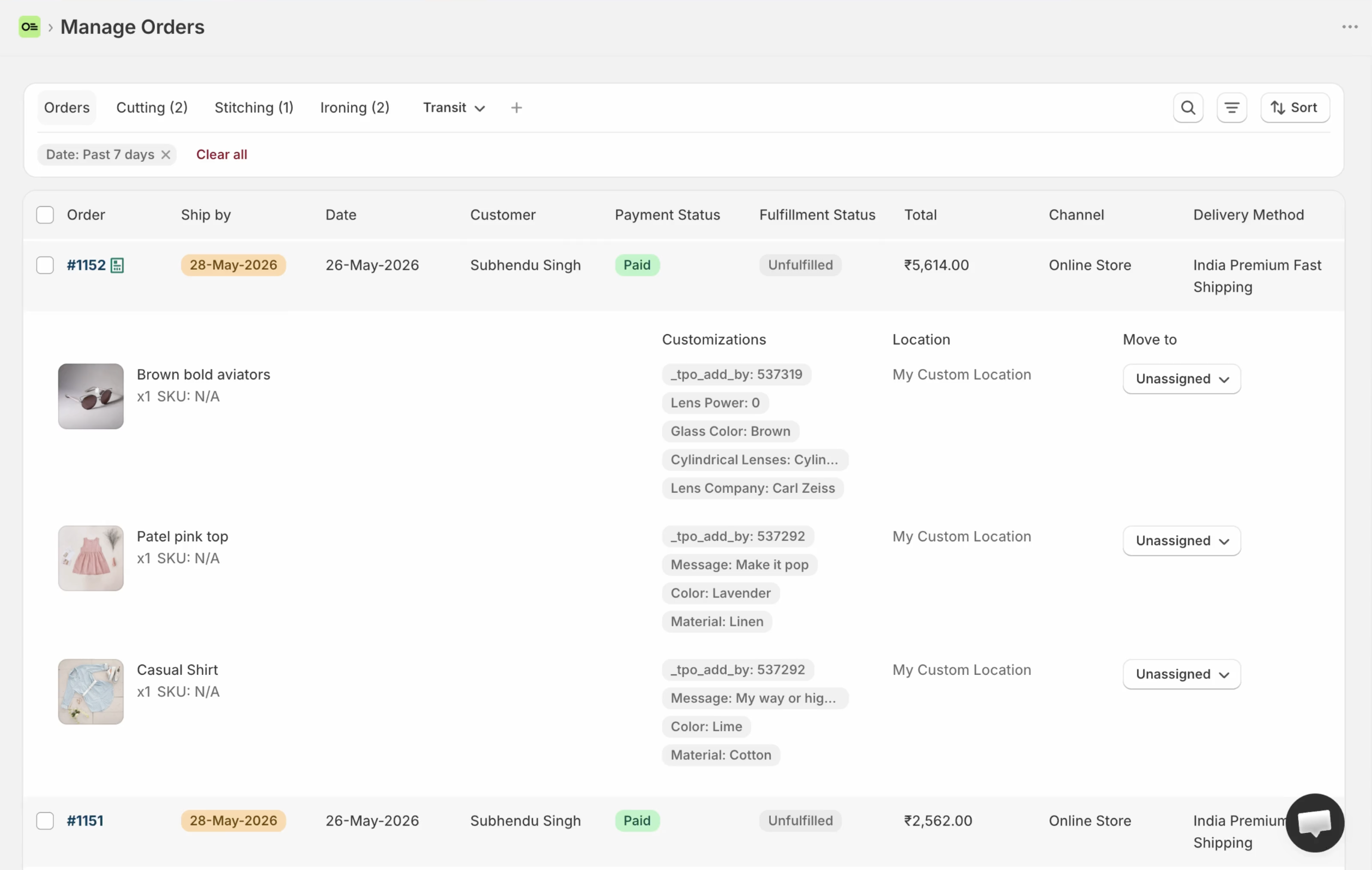
Orderline’s production list: images, line items, customizations, statuses, and ship-by in one place — a screen, not a snapshot.
Key takeaways
- Order Printer Pro solves documents: branded PDF invoices, quotes, receipts, packing slips, in bulk, with template customization and metafields (App Store listing, 31 July 2026).
- A printed slip can show what to make — once. It can’t show the stage it’s in now, what’s due first, or any change that happens after printing.
- Orderline is the live work list inside Shopify Admin that the team runs the morning on: line-item images and customizations, internal stages, ship-by urgency, and fulfill from the same screen. It also prints bulk packing slips — functional, not a branded document designer.
- Order Printer Pro is free up to 50 orders a month, then $10–$40 by volume; Orderline is $9 / $19 / $39 per billing period with a 7-day trial (pricing, checked 31 July 2026). Many shops will carry both, because the jobs barely overlap.
What job are we solving?
This page is about one job: the production queue for personalized Shopify orders — what to make, in what stage, and when it should leave, after payment is in.
It is not about:
- Whether your invoices and quotes look professional (a real job — just a different one)
- Customer-facing order tracking after shipping
- Replacing Shopify payment, refunds, or the official order record
If your team’s real pain is reading customizations off the Shopify Orders list, also read Orderline vs Shopify Orders. This page assumes the workaround you reached for was paper.
How people use order printer apps today
Paper on the bench
The pattern is older than Shopify apps: print the order, clip it to the job, carry it to the bench. A document app makes that paper useful — line items, options, notes, and your branding on one clean page instead of Shopify’s admin view. With Order Printer Pro specifically, merchants print and export in bulk, print draft orders, automate PDF invoices, and customize templates, including metafields on documents (App Store listing, 31 July 2026).
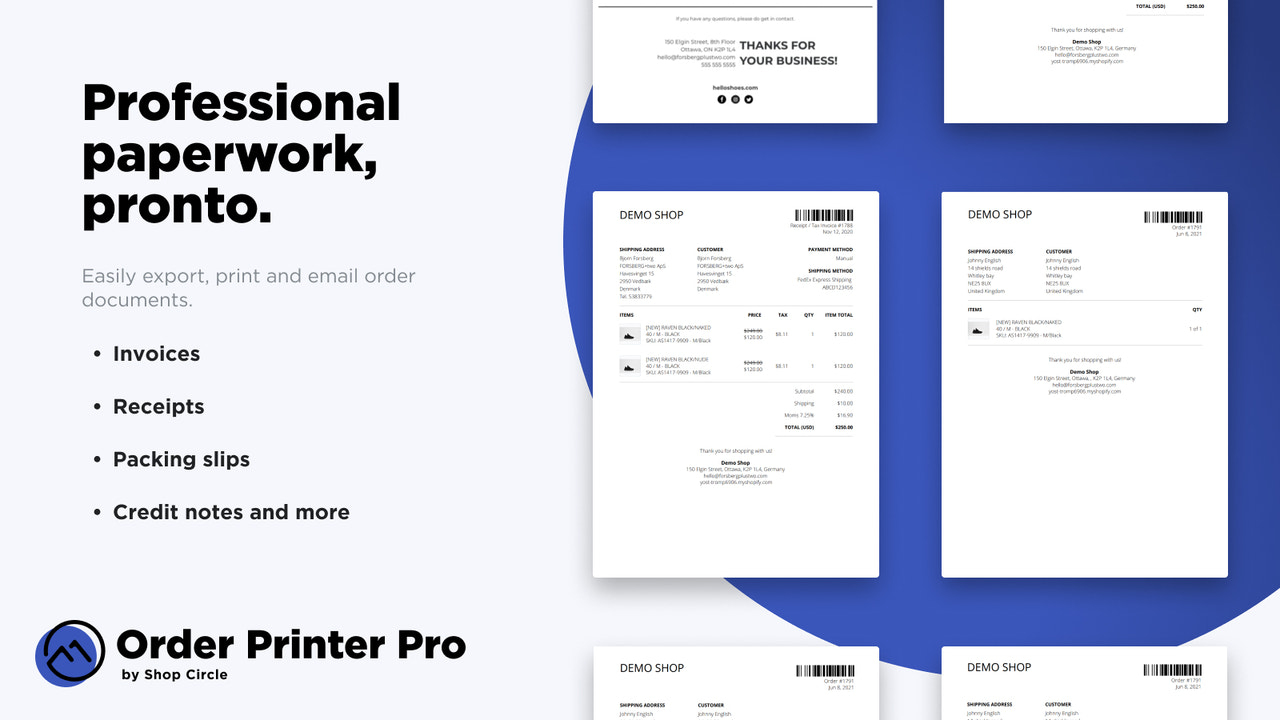
Order Printer Pro PDF documents with line items (public App Store listing — same asset already used on the custom-orders blog).
Why documents feel like they solve it
For a small shop, a printed slip per order genuinely works. The engraving text is right there. The paper travels with the job. There’s nothing to log into. If you’ve ever watched a maker tape a slip to a box lid, you’ve seen the appeal.
The quiet ceiling
Paper has one state: whatever was true when it printed. The customer emails a spelling fix at 10 a.m., the slip on the bench still shows the old engraving. Two people grab the same job because nothing says it’s claimed. “What’s due today?” means shuffling the stack. None of that is a flaw in a printer app — it’s what paper is.
Where documents break for made-to-order work at volume
A snapshot, not a status
A PDF or printed slip freezes the order at print time. It can’t answer the questions that run a production morning: which jobs are in proof, which are in polish, which are waiting on a customer reply. Stage lives in someone’s head, or in piles on the bench — until a pile gets knocked over.
No ship-by that stays current
You can print a due date on a slip. You can’t re-sort the stack automatically when a rush order lands, and the printed date won’t turn red when it’s late. Urgency needs a live surface.
Edits don’t reach the bench
Refunds, line edits, address changes, and new notes update Shopify — not the paper. Someone has to notice, reprint, and make sure the old slip is actually thrown away. At five orders a day that’s a nuisance; at fifty it’s how mistakes ship.
Fulfillment still happens elsewhere
Marking a job done on paper changes nothing in Shopify. Staff fulfill in Admin as a separate step, and the slip can’t confirm it happened. A live list closes that loop in the same place the work is tracked.
Order Printer Pro vs Orderline, side by side
| What you need | Order Printer Pro | Orderline |
|---|---|---|
| See line items and custom details on one surface | Strong on documents — bulk print/export; templates; product/variant/customer and order/draft metafields (App Store, 1 Aug 2026). Line item properties not named on the listing — confirm in templates if you rely on them | Strong — unified orders view with images on the live list |
| Internal production stages in your shop’s words | No — documents don’t carry status | Custom statuses, optional groups, colors (statuses guide) |
| Ship-by or “must leave by” with live urgency | No — printed dates are static | Ship-by with urgency; automatic rules or dates you set / Flow can write (ship-by guide) |
| Branded PDF invoices, quotes, receipts for customers | Strong — that’s the product | No — Orderline is not a document designer |
| Packing slips for the physical pack pass | Strong, templated | Bulk packing slips — functional, from the work list |
| Draft orders before payment | Print/export drafts | Drafts board with its own statuses |
| Stay in sync when orders change | Reprint manually | Live — embedded app on the Shopify order |
| Customer “where is my order?” after shipping | No (documents aren’t tracking) | Not Orderline’s main job |
| Bills of materials and factory planning | No | No — use manufacturing software if that is the real need |
| Fulfill, pack, buy labels | No — fulfill stays in Admin | Fulfill from Orderline with sync, packing slips, optional Shippo labels |
| Money cost | Free up to 50 orders/mo; then $10 / $20 / $40 by volume (14-day trial on paid) | Starter $9, Pro $19, Pro+ $39 per period; 7-day trial (pricing, 31 July 2026) |
| Time to start | Install and pick a template | Install and open the list; add stages when ready |
One wording note for accuracy: Order Printer Pro’s listing verifies metafields on documents. If your customizations arrive as line-item properties rather than metafields, confirm they print on your template before you rely on paper alone (App Store listing, 31 July 2026).
How they work together
This is one of the easier pairs to share, because the jobs barely overlap:
- Run the day in Orderline — the live queue: images, customizations, stages, ship-by urgency, saved views.
- Print customer-facing documents from a printer app — invoices, quotes, branded receipts.
- Pack from wherever you prefer — Orderline’s bulk packing slips, or your printer templates if the bench loves paper.
- Keep Shopify Admin for payment, refunds, risk, and the official order.
A calm first week: install Orderline and confirm images and options show without opening each order; name your real stages; turn on ship-by if deadlines matter; keep the printer app for the documents your customers see. Nobody has to give up paper on day one.
When printed documents are enough
Stay document-only when volume is low, one or two people touch the work, and a slip clipped to the job genuinely answers “what do I make and by when.” Stay too when the real gap was never production tracking at all — it was professional invoices and quotes, which is exactly what a printer app is for.
Choose something else entirely when you need full materials and manufacturing orders as the system of record, or automatic customer progress messages. Those are different categories.
When Orderline is the wrong buy (fair)
Orderline is a poor fit if:
- Your only gap was branded PDF documents — invoices, quotes, receipts
- The bench runs fine on paper and volume is genuinely small
- You won’t pay for an ops app when a free document tier covers the pain
- You need materials, costing, or factory planning, not a work list
Order Printer Pro wins on documents — polish, templates, and a free tier under 50 orders a month. Orderline wins on the live morning queue — stages, ship-by, and a list that updates with the order.
Common questions
Can Orderline replace my printer app?
For packing slips, mostly — Orderline prints them in bulk from the work list. For branded customer-facing invoices, quotes, and receipts, no: Orderline isn’t a document designer. Many shops will run both.
Does a printed packing slip show my customizations?
With Order Printer Pro, the listing verifies metafields on documents and customizable templates — check that your specific line-item properties print on your chosen template. On screen, Orderline shows line-item customizations on the list itself, no template setup needed.
Is paper really that risky?
At low volume, no — it’s a proven system. The risk scales with order count and staff count: edits that don’t reach the bench, duplicated jobs, due dates hiding in a stack. That’s the point where a live list pays for itself in avoided mistakes.
What does this cost compared with a printer app?
Order Printer Pro is free up to 50 orders a month, then $10–$40 by volume. Orderline runs $9 to $39 per billing period depending on volume and staff, with a 7-day trial — pricing has the live numbers. They solve different jobs, so the honest comparison is which problem you actually have.
What to do next
If the paper system works except that nobody knows what stage anything is in — or edits keep shipping because the bench had old slips — try the live list.
- Install Orderline (7-day trial)
- Pricing
- Who it’s for
- Related: Orderline vs Shopify Orders · Orderline vs tags and Shopify Flow · Orderline vs Google Sheets · Unified orders view
Sources (retrieved 31 July 2026)
- Order Printer Pro: PDF Invoice, Shopify App Store listing (rating, pricing, features) — https://apps.shopify.com/order-printer-pro
- Peer tools research packet —
apps/growth/compare/research/peer-tools-research-2026-07-31.md(§3.1) - Orderline product truth —
context/about-orderline.mdand live guides - Orderline pricing — https://orderlinehq.com/pricing
- Framework —
apps/growth/compare/vs-pages-framework.md(Template W; printer class BLUF)